關於使用條款隱私政策聯絡
 
更新中
MyToday - Diary

MyToday - Diary

發行日期:2016-09-22
© 2022. MYSLAB All rights reserved.
MyToday - Diary - QR碼
版本 2.3.0
4+
App Store 下載
版本 2.3.0
4+
App Store 下載
發行日期:2016-09-22
© 2022. MYSLAB All rights reserved.

iPhone Screenshots

擷圖
擷圖
擷圖
擷圖

iPad Screenshots

擷圖
擷圖
擷圖
擷圖

說明

MyToday is a diary you can easily write everything on.
The app is for those who love writing diaries.
Start with MyToday.
[Please read]
My Today does not store user data on the server.
The data is saved on the user's mobile phone. If My Today data is accidentally deleted for getting device capacity,
the text will not be visible and cannot be recovered.
In order to keep your valuable articles safely, it is recommended to periodically backup to 'Dropbox' or 'Google Drive'. (Required before device change / reset)
You can Backup from the setting of the My Today App.
[How to use MYTODAY]
• You can create today's diary by selecting the top area of ​​the main screen.
• Select the camera icon to take a picture and attach it immediately.
• When you select the picture icon, you can attach up to 10 pictures from the camera roll.
• The location icon can add your current location or specific location information.
• If you touch the expansion icon, you can write and edit pictures on a wide screen.
• You can edit or delete the created list in the main screen by swiping left.
• You can use the full editing function by swiping the created list on the main screen to the right.
• On a 3D Touch-enabled device, you can edit or delete the list directly by tapping the list.
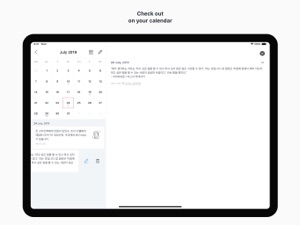
• You can check the diary by date by selecting the calendar icon in the upper right corner.
• You can find the diary by using the search icon in the upper left corner.
• Swipe up the calendar on the calendar screen to view the list on a wider screen.
• You can move the month with the left and right swipe gestures on the calendar screen, and you can see the previous year or the following year through the year view icon at the top.
• Dropbox backup and recovery is possible in the settings.
• You can back up data by e-mail in Settings.
• Notifications are available daily in Settings.
• You can check the written text only by yourself. You can make your passwords safer by setting passwords.
• For more information on backing up and restoring your data, please check the developer website.
Thank you for using My Today. :)

此版本中有什麼更新? (2.3.0)

• A minor error has been fixed.

資訊

開發人員

版本

2.3.0

大小

33.8 MB

Game Center

VPP Device Licensing

喜好程度

分級:4+

相容性

iOS 17.0 或更新版本

裝置

iPhone 5s, iPhone 6, iPhone 6 Plus, iPhone 6s, iPhone 6s Plus, iPhone SE, iPhone 7, iPhone 7 Plus, iPhone 8, iPhone 8 Plus, iPhone X, iPhone XR, iPhone XS, iPhone XS Max, iPhone 11, iPhone 11 Pro, iPhone 11 Pro Max, iPhone SE(第 2 代), iPhone 12, iPhone 12 Pro, iPhone 12 Pro Max, iPhone 12 mini, iPhone 13, iPhone 13 Pro, iPhone 13 Pro Max, iPhone 13 mini, iPhone SE(第 3 代), iPhone 14, iPhone 14 Plus, iPhone 14 Pro, iPhone 14 Pro Max, iPhone 15, iPhone 15 Plus, iPhone 15 Pro, iPhone 15 Pro Max, iPhone 16, iPhone 16 Plus, iPhone 16 Pro, iPhone 16 Pro Max, iPhone 16e, iPhone 17, iPhone 17 Pro, iPhone 17 Pro Max, iPhone Air, iPhone 17e, iPad(第 5 代)Wi-Fi, iPad(第 5 代)Wi-Fi + Cellular, iPad(第 6 代)Wi-Fi, iPad(第 6 代)Wi-Fi + Cellular, iPad Pro, iPad Pro (Cellular), iPad Pro(9.7 英吋), iPad Pro(9.7 英吋)(Cellular), iPad Pro 12.9 英寸(第 2 代), iPad Pro 12.9 英寸(第 2 代) Wi-Fi + Cellular, iPad Pro(10.5 英寸), iPad Pro(10.5 英寸) Wi-Fi + Cellular, iPad Pro(11 英寸), iPad Pro(11 英寸) Wi-Fi + Cellular, iPad Pro 12.9 英寸(第 3 代), iPad Pro 12.9 英寸(第 3 代) Wi-Fi + Cellular, iPad Air, iPad Air (Cellular), iPad Air 2, iPad Air 2 (Cellular), iPad Air(第三代), iPad Air(第三代) Wi-Fi + Cellular, iPad mini Retina, iPad mini Retina (Cellular), iPad mini 3, iPad mini 3 (Cellular), iPad mini 4, iPad mini 4 (Cellular), iPad mini(第 5 代), iPad mini(第 5 代)Wi-Fi + Cellular, iPad(第 7 代)Wi-Fi + Cellular, iPad Pro(11 英寸,第 2 代), iPad Pro(11 英寸,第 2 代)(Wi-Fi + 行動網路), iPad Pro(12.9 英寸,第 4 代), iPad Pro(12.9 英寸,第 4 代)(Wi-Fi + 行動網路), iPad Air(第四代)(Wi-Fi), iPad Air(第四代)(Wi-Fi + Cellular), iPad(第 8 代)Wi-Fi, iPad(第 8 代)Wi-Fi + Cellular, iPad Pro(11 英寸,第 3 代), iPad Pro(11 英寸,第 3 代)(Wi-Fi + 行動網路), iPad Pro(12.9 英寸,第 5 代), iPad Pro(12.9 英寸,第 5 代)(Wi-Fi + 行動網路), iPad(第 9 代), iPad(第 9 代)Wi-Fi + Cellular, iPad mini(第 6 代), iPad mini(第 6 代)Wi-Fi + Cellular, iPad Air(第 5 代), iPad Air(第 5 代) Wi-Fi + Cellular, iPad Pro(11 英寸,第 4 代), iPad Pro(11 英寸,第 4 代)(Wi-Fi + 行動網路), iPad Pro(12.9 英寸,第 6 代), iPad Pro(12.9 英寸,第 6 代)(Wi-Fi + 行動網路), iPad(第 10 代), iPad(第 10 代)(Wi-Fi + 行動網路), iPad Air 11 吋(M2)Wi-Fi, iPad Air 13 吋(M2)Wi-Fi, iPad Air 13 吋(M2)Wi-Fi + 行動網路, iPad Pro 11 吋(M4)Wi-Fi, iPad Pro 11 吋(M4)Wi-Fi + 行動網路, iPad Pro 13 吋(M4)Wi-Fi, iPad Pro 13 吋(M4)Wi-Fi + 行動網路, iPad mini(A17 Pro)Wi-Fi, iPad mini(A17 Pro)Wi-Fi + 行動網路, iPad(A16,Wi-Fi), iPad(A16,Wi-Fi + 行動網路), iPad Air(11 吋,M3,Wi-Fi), iPad Air(11 吋,M3,Wi-Fi + 行動網路), iPad Air(13 吋,M3,Wi-Fi), iPad Air(13 吋,M3,Wi-Fi + 行動網路), iPad Pro 11 吋(M5)Wi-Fi, iPad Pro 11 吋(M5)Wi-Fi + 行動網路, iPad Pro 13 吋(M5)Wi-Fi, iPad Pro 13 吋(M5)Wi-Fi + 行動網路, iPad Air(11 吋,M4,Wi-Fi), iPad Air(11 吋,M4,Wi-Fi + 行動網路), iPad Air(13 吋,M4,Wi-Fi), iPad Air(13 吋,M4,Wi-Fi + 行動網路), iPod touch (第六代), iPod touch (第 7 代)

語言

英文, 韓文

App Store:評等

評分與評論

4.7/5 (3 評等)

App Store:評論

2017-05-20

Wish

I have to say this is a really nice app for me. But I wish it can add the HASHTAG function. More convenient.
ckl39
版本 1.1.3