更新中


iPhone Screenshots



iPad Screenshots


說明
AcoustiTools® — Professional Tools for iPhone and iPad with Augmented Reality for Live Sound, Studio, Car Audio, and Home Theater. AcoustiTools is a new generation of professional-grade audio analysis and diagnostic tools using ARKit to elevate the audio experience.
Five interactive modules – four tile display:
1) Audio Information in Augmented Reality
Know the volume level across the venue using the ground-breaking AR Spatial Analyzer module. This module uses augmented reality (AR) to tag locations and calculate the volume level, distance, and delay for each placed tag. Ever need to use asymmetrically placed speakers? Prevent a blurred delay of sound for the audience. With the AR Spatial Analyzer module, you can instantly know how to accommodate for the depth difference and correct the time alignment.
- Map The Volume
The Volume Variance feature uses tagged locations to quickly map the sound level variations from tagged and labeled main speakers to your current position. The live values display in a 2D overlay allowing you to monitor the sound levels across the audience and keep the volume enjoyable for everyone.
- Simplify Delay Timing
The Delay Calc feature makes it simple to solve delay problems, calculating the delay timing between a tagged and labeled front speaker and delay stack. The displayed results give you the information needed to quickly sync your audio.
2) Diagnostic PEQ (in-app-purchase)
Using the revolutionary real-time Diagnostic PEQ (parametric equalizer) module to listen to pink noise, receive recommended corrective EQ settings to implement for tuning your audio system, whether you’re in a large or small space.
Want to reduce the stress of identifying the most problematic frequencies under pressure and choosing the most effective EQ settings to correct it? Available through in-app-purchase, the revolutionary Diagnostic PEQ module diagnoses your audio and recommends a corrective EQ curve to implement for your mix based on live audio or averaged recorded samples. With values for each setting of your PEQ — the center frequency, the Q, and the amplitude — you have a professional, real-time solution to your immediate audio challenges.
3) Diagnostic GEQ (in-app-purchase)
If your system uses a graphic equalizer, use the revolutionary real-time Diagnostic GEQ (graphic equalizer) module to listen to pink noise and receive recommended corrective GEQ settings to implement for tuning your audio system, whether you’re in a large or small space.
Want to quickly balance your car’s audio system? Set the Diagnostic GEQ to match the number of bands your car’s audio system uses.
Available through in-app-purchase, the revolutionary Diagnostic GEQ module diagnoses your audio and recommends a corrective EQ curve based on live audio or averaged recorded samples making it easy to get the most out of your audio system.
4) Real-Time Analyzer
The RTA module gives you the information you need to determine the best on-the-fly frequency corrections. The AcoustiTools RTA module includes a red problem frequency line to highlight the frequency on the RTA graph with the largest difference from surrounding frequencies. You can also keep your eye on a specific frequency you set using the blue selectable frequency line. Easily switch between a spectrum color display for bright environments or display the graph in solid blue for dimmer environments.
5) dB Meter
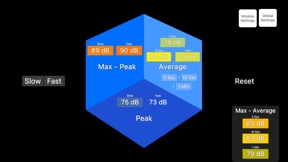
- Max-Peak/Max-Average
- Fast/Slow
- User selectable Max-Average time periods
- Threshold Alerts
__________
AcoustiTools’ innovative design simultaneously displays four active modules. This breakthrough feature allows you to view information from multiple modules at once and quickly select a module to interact with.
Global Features:
- Spectral Weightings
- Averaging Options
- Selectable Block Sizes
- Microphone Calibration Trim
AcoustiTools — superpowers in your hands.
For tutorial videos & the user guide, go to www.acousticmasterminds.com
此版本中有什麼更新? (2.2.00)
NEW Additions/Improvements
dB Meter module:
- Max-Average (RMS) panel (can display up to 3 time periods at once)
- Average section of cube can display up to 3 time periods at once
- Both Max-Average (RMS) panel and Average section of cube's time periods can be modified by the Averaging options in the Module Settings
- Able to display Slow, Fast, or both at once
Diagnostic PEQ module:
- Switch between displaying the Q or Bandwidth for each filter in the Module Settings
- Record samples in each of your listening positions and view the suggested averaged corrective curve to implement for your space
-- Rename samples, turn individual samples on/off, re-record specific samples, delete samples, and customize the sample colors
Diagnostic GEQ module:
- Record samples in each of your listening positions and view the suggested averaged corrective curve to implement for your space
-- Rename samples, turn individual samples on/off, re-record specific samples, delete samples, and customize the sample colors
AR Spatial Analyzer module:
- dB Color Thresholds now customizable in Module Settings
Global Settings module:
- Microphone Calibration Trim
-- Customize your device's internal microphone calibration to the decimal place
-- External microphone calibration support
--- When an external microphone is plugged in, the Microphone Calibration Trim will specify that it recognizes an external microphone and let you set a separate trim value
In-App Tours:
- Updated the In-App Tours to include walkthroughs of the new features (available by tapping the AcoustiTools logo in the center of the main tile screen to open the sort order screen, followed by tapping the info button at the top-right of the screen, and then selecting "Tours")
Improved underlying processes
銷售商
名稱
ACOUSTIC MASTERMINDS INC.
資訊
類別
版本
2.2.00
大小
165.5 MB
Game Center
否
VPP Device Licensing
是
喜好程度
分級:4+
相容性
iOS 13.3 或更新版本
裝置
iPhone 6s, iPhone 6s Plus, iPhone SE, iPhone 7, iPhone 7 Plus, iPhone 8, iPhone 8 Plus, iPhone X, iPhone XR, iPhone XS, iPhone XS Max, iPhone 11, iPhone 11 Pro, iPhone 11 Pro Max, iPhone SE(第 2 代), iPhone 12, iPhone 12 Pro, iPhone 12 Pro Max, iPhone 12 mini, iPhone 13, iPhone 13 Pro, iPhone 13 Pro Max, iPhone 13 mini, iPhone SE(第 3 代), iPhone 14, iPhone 14 Plus, iPhone 14 Pro, iPhone 14 Pro Max, iPhone 15, iPhone 15 Plus, iPhone 15 Pro, iPhone 15 Pro Max, iPhone 16, iPhone 16 Plus, iPhone 16 Pro, iPhone 16 Pro Max, iPhone 16e, iPhone 17, iPhone 17 Pro, iPhone 17 Pro Max, iPhone Air, iPad(第 5 代)Wi-Fi, iPad(第 5 代)Wi-Fi + Cellular, iPad(第 6 代)Wi-Fi, iPad(第 6 代)Wi-Fi + Cellular, iPad Pro, iPad Pro (Cellular), iPad Pro(9.7 英吋), iPad Pro(9.7 英吋)(Cellular), iPad Pro 12.9 英寸(第 2 代), iPad Pro 12.9 英寸(第 2 代) Wi-Fi + Cellular, iPad Pro(10.5 英寸), iPad Pro(10.5 英寸) Wi-Fi + Cellular, iPad Pro(11 英寸), iPad Pro(11 英寸) Wi-Fi + Cellular, iPad Pro 12.9 英寸(第 3 代), iPad Pro 12.9 英寸(第 3 代) Wi-Fi + Cellular, iPad Air(第三代), iPad Air(第三代) Wi-Fi + Cellular, iPad mini(第 5 代), iPad mini(第 5 代)Wi-Fi + Cellular, iPad(第 7 代)Wi-Fi + Cellular, iPad Pro(11 英寸,第 2 代), iPad Pro(11 英寸,第 2 代)(Wi-Fi + 行動網路), iPad Pro(12.9 英寸,第 4 代), iPad Pro(12.9 英寸,第 4 代)(Wi-Fi + 行動網路), iPad Air(第四代)(Wi-Fi), iPad Air(第四代)(Wi-Fi + Cellular), iPad(第 8 代)Wi-Fi, iPad(第 8 代)Wi-Fi + Cellular, iPad Pro(11 英寸,第 3 代), iPad Pro(11 英寸,第 3 代)(Wi-Fi + 行動網路), iPad Pro(12.9 英寸,第 5 代), iPad Pro(12.9 英寸,第 5 代)(Wi-Fi + 行動網路), iPad(第 9 代), iPad(第 9 代)Wi-Fi + Cellular, iPad mini(第 6 代), iPad mini(第 6 代)Wi-Fi + Cellular, iPad Air(第 5 代), iPad Air(第 5 代) Wi-Fi + Cellular, iPad Pro(11 英寸,第 4 代), iPad Pro(11 英寸,第 4 代)(Wi-Fi + 行動網路), iPad Pro(12.9 英寸,第 6 代), iPad Pro(12.9 英寸,第 6 代)(Wi-Fi + 行動網路), iPad(第 10 代), iPad(第 10 代)(Wi-Fi + 行動網路), iPad Air 11 吋(M2)Wi-Fi, iPad Air 13 吋(M2)Wi-Fi, iPad Air 13 吋(M2)Wi-Fi + 行動網路, iPad Pro 11 吋(M4)Wi-Fi, iPad Pro 11 吋(M4)Wi-Fi + 行動網路, iPad Pro 13 吋(M4)Wi-Fi, iPad Pro 13 吋(M4)Wi-Fi + 行動網路, iPad mini(A17 Pro)Wi-Fi, iPad mini(A17 Pro)Wi-Fi + 行動網路, iPad(A16,Wi-Fi), iPad(A16,Wi-Fi + 行動網路), iPad Air(11 吋,M3,Wi-Fi), iPad Air(11 吋,M3,Wi-Fi + 行動網路), iPad Air(13 吋,M3,Wi-Fi), iPad Air(13 吋,M3,Wi-Fi + 行動網路), iPad Pro 11 吋(M5)Wi-Fi, iPad Pro 11 吋(M5)Wi-Fi + 行動網路, iPad Pro 13 吋(M5)Wi-Fi, iPad Pro 13 吋(M5)Wi-Fi + 行動網路, iPod touch (第 7 代)
語言
英文
App Store:評等
評分與評論
0.0/5 (無評分)
App Store:評論
無條目