關於使用條款隱私政策聯絡
 
更新中
Insta360 GO

Insta360 GO

發行日期:2019-08-28
© 2016 Shenzhen Arashi Vision Company Limited
Insta360 GO - QR碼
版本 1.4.2
17+
App Store 下載
版本 1.4.2
17+
App Store 下載
發行日期:2019-08-28
© 2016 Shenzhen Arashi Vision Company Limited

iPhone Screenshots

擷圖
擷圖
擷圖
擷圖
擷圖

iPad Screenshots

擷圖
擷圖
擷圖
擷圖
擷圖

說明

Insta360 GO is the Ant-Man of cameras. Weighing in at 18.3 grams (that’s less than a fun-size Snickers), it goes places that other cameras can’t, captures angles other cameras don’t, and never gets in the way. The companion app is the sidekick to your new twenty-gram steady cam.
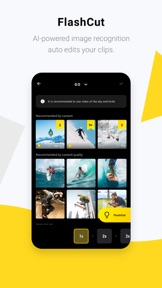
AI-powered auto-editing.
GO’s app doesn’t just save time and hassle during capture. It also cuts the hassle out of finding and editing your best clips. Here’s the kicker, it works with your phones footage too!
GO uses AI-powered image recognition to sort clips and combine them — on beat — into a stylized edit. GO can sort content based on theme (e.g. travel, food, sports), quality of shot composition, and a user’s past preferences. With GO, users can capture, edit and share their day in a few taps.
Hyperlapses made easy.
Thanks to its next-level stabilization, GO makes hyperlapses easy. Mind-blowing shots that used to take expensive gear and hours of editing can now be accomplished with a tap. GO captures hyperlapses for up to 30 minutes at 6x speed.
Stationary timelapses are just as easy. GO’s mount-anywhere design lets users capture the flow of time from impossible perspectives, Shoot for hours. All with the app.
Bluetooth Control
Use Bluetooth to control GO from a distance. Edit your settings or remap the Action button. It’s simple and super convenient for when GO is mounted out of reach.
Supported social platforms: Insta360 Community, Youtube, Instagram, Facebook, Whatsapp, Twitter, Snapchat, WeChat, Weibo, Vibrato, Line.
*Compatibility: Subject to the Insta360.com compatibility list.
Stop by and learn more at: www.insta360.com
Having some issues? Let us know at support@insta360.com

此版本中有什麼更新? (1.4.2)

1. You can now toggle "Anti-Flicker" in the Settings page.
2. Routine bug fixes and user experience improvements.

銷售商

名稱

Shenzhen Arashi Vision Co., Ltd.

資訊

類別

版本

1.4.2

大小

659.1 MB

Game Center

VPP Device Licensing

喜好程度

Rated 17+ for the following:
偶而/輕微的現實暴力
偶而/輕微的模擬賭博
頻繁/強烈的驚悚/恐怖題材
頻繁/強烈的成人/性暗示題材
偶而/輕微的酒精、菸草或藥物使用或相關內容
頻繁/強度醫藥/醫療資訊
頻繁/強烈的卡通或幻想暴力
頻繁/強烈的粗話或低俗幽默
偶而/輕微的色情內容與裸露

相容性

iOS 9.0 或更新版本

裝置

iPhone 5s, iPhone 6, iPhone 6 Plus, iPhone 6s, iPhone 6s Plus, iPhone SE, iPhone 7, iPhone 7 Plus, iPhone 8, iPhone 8 Plus, iPhone X, iPhone XR, iPhone XS, iPhone XS Max, iPhone 11, iPhone 11 Pro, iPhone 11 Pro Max, iPhone SE(第 2 代), iPad(第 5 代)Wi-Fi, iPad(第 5 代)Wi-Fi + Cellular, iPad(第 6 代)Wi-Fi, iPad(第 6 代)Wi-Fi + Cellular, iPad Pro, iPad Pro (Cellular), iPad Pro(9.7 英吋), iPad Pro(9.7 英吋)(Cellular), iPad Pro 12.9 英寸(第 2 代), iPad Pro 12.9 英寸(第 2 代) Wi-Fi + Cellular, iPad Pro(10.5 英寸), iPad Pro(10.5 英寸) Wi-Fi + Cellular, iPad Pro(11 英寸), iPad Pro(11 英寸) Wi-Fi + Cellular, iPad Pro 12.9 英寸(第 3 代), iPad Pro 12.9 英寸(第 3 代) Wi-Fi + Cellular, iPad Air, iPad Air (Cellular), iPad Air 2, iPad Air 2 (Cellular), iPad Air(第三代), iPad Air(第三代) Wi-Fi + Cellular, iPad mini Retina, iPad mini Retina (Cellular), iPad mini 3, iPad mini 3 (Cellular), iPad mini 4, iPad mini 4 (Cellular), iPad mini(第 5 代), iPad mini(第 5 代)Wi-Fi + Cellular, iPad(第 7 代)Wi-Fi + Cellular, iPad Pro(11 英寸,第 2 代), iPad Pro(11 英寸,第 2 代)(Wi-Fi + 行動網路), iPad Pro(12.9 英寸,第 4 代), iPad Pro(12.9 英寸,第 4 代)(Wi-Fi + 行動網路), iPad Air4, iPad Air4Cellular, iPad EighthGen, iPad EighthGenCellular, iPod touch (第六代), iPod touch (第 7 代)

語言

中文, 日文, 英文

App Store:評等

評分與評論

3.0/5 (6 評等)

App Store:評論

2020-06-14

為何在ipad處理不能上傳,也不能存相簿

可以改善嗎?
gwjh12389
版本 1.4.1
2019-10-04

看影片都沒聲音

不管是下載還是自己拍攝的影片都沒聲音,編輯影片放入音樂檔也沒聲音,這是要怎麼編輯啊,只有轉到自己照片簿才有聲音。
eddi3b8
版本 1.2.3