更新中


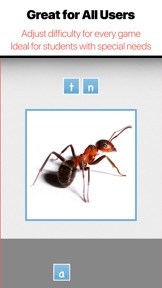
iPhone Screenshots


iPad Screenshots



說明
BITSBOARD PRO vs. BITSBOARD STUDENT
• The PRO app is for teachers. It includes access to the Bitsboard catalog to quickly download, create, customize and share your own boards and classes. The PRO app also makes it really easy to add students, share content with students, and keep track of your student's progress.
• The STUDENT app was created for students. It allows schools to give students full access to the Bitsboard app on each iPad without having to pay the fee of the PRO app. The STUDENT app does not include the ability to create and share classes.
Licensing terms
• Please buy one PRO app per device / per teacher unless teachers share the same iPad
• Please buy one STUDENT app per device (you can add unlimited students per device). You can also add one student per device via the FREE app
A top 5 education game in the U.S.
Spark excitement for learning with Bitsboard – an interactive learning app trusted by over 5 million parents, teachers and students worldwide. Create your own learning experience with 35+ educational activities, join a private classroom or dive into thousands of hand-curated flashcard decks – whatever you want to learn, Bitsboard is here to make it fun and make it stick!
What you can do with the Bitsboard app:
Teachers
• Create lessons in minutes with beautiful images and clear audio
• Adapt lessons to an individual user’s learning speed
• Encourage higher level thinking with fun single/multiplayer mini-games
• Keep track of individual progress
• Automatically back up and sync data across devices
Students
• Turn boring assignments into addictive mini-games
• Master languages, vocab, reading, spelling and more
• Compete in multiplayer games with classmates
• Study at your own pace or with others
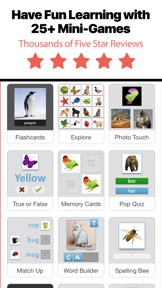
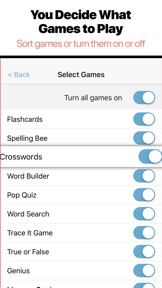
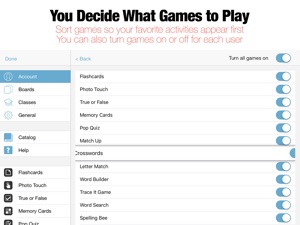
OVER 35+ POWERFUL MINI GAMES / STUDY MODES IN 1 APP INCLUDING
• Flashcards
• Photo Touch
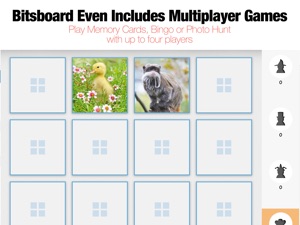
• Memory Cards (1-4 players)
• Pop Quiz
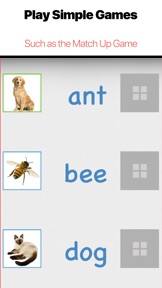
• Match Up
• Word Builder
• Sentence Builder
• Spelling Bee
• BINGO (1-4 players)
• Letter Tracing
• Sequencing
• Related Items
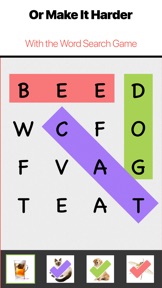
• Word Search
• Crosswords
• Letter Match
• Odd One Out
• What Comes Next?
• Side by Side
• Word Chunks
• Communicator
• Reader
• Questions Game
• Photo Hunt (1-4 players)
• Racing Rivals (2 players)
• Battle Time (2 players)
• Say It Game
TRACKS YOUR PROGRESS
• Bitsboard keeps track of every answer for every game, user, and board
SUPPORTS MULTIPLE USERS
• Bitsboard makes it easy to add multiple users and switch between user accounts
• You can now instantly review the detailed progress for each user
• Automatically saves game settings at the user level
ACCESSIBILITY OPTIONS
• Bitsboard fully supports switch control to make all of the games accessible for users with disabilities
ORGANIZE YOUR BOARDS
• You can now group your boards into classes.
• Each board can fit into as many classes as you like.
• Organize your boards by class, user, subject, and more.
ACCELERATE YOUR LEARNING
• Bitsboard's learning algorithm automatically personalizes each game based on the players skills.
SHARE AND SYNC CONTENT ACROSS DEVICES
• Automatically back up and sync data across devices
BITSBOARD CLASSES
• Share and automatically sync all of your content with other users / students on other devices
• Bitsboard classes are private - only you and the students you approve see your content
CLOUD SYNC
• With cloud sync all of your boards, students, classes, and settings are automatically backed up and sync across all of your devices
QR LOGIN CARDS
To protect student’s privacy you can add student accounts without email or password.
Just email the QR code to your student and they will be able to download the free Bitsboard app and log into their Bitsboard account.
Have questions? We are here to help. Email us at support@happymooseapps.com
Privacy Policy: http://bitsboard.com/privacy-policy
Subscription Terms: http://bitsboard.com/subscription-terms
此版本中有什麼更新? (4.1)
We've added support for AI Image generation!
Now, whenever you create a new flashcard, if you're not satisfied with one of our suggested images, simply press the 'AI Image' button to have a new image generated instantly. This feature is available both in the main board creator and within Settings > Boards, where you can edit your boards.
資訊
開發人員
類別
版本
4.1
大小
142.6 MB
Game Center
否
VPP Device Licensing
是
喜好程度
分級:4+
相容性
iOS 14.0 或更新版本
裝置
iPhone 5s, iPhone 6, iPhone 6 Plus, iPhone 6s, iPhone 6s Plus, iPhone SE, iPhone 7, iPhone 7 Plus, iPhone 8, iPhone 8 Plus, iPhone X, iPhone XR, iPhone XS, iPhone XS Max, iPhone 11, iPhone 11 Pro, iPhone 11 Pro Max, iPhone SE(第 2 代), iPhone 12, iPhone 12 Pro, iPhone 12 Pro Max, iPhone 12 mini, iPhone 13, iPhone 13 Pro, iPhone 13 Pro Max, iPhone 13 mini, iPhone SE(第 3 代), iPhone 14, iPhone 14 Plus, iPhone 14 Pro, iPhone 14 Pro Max, iPhone 15, iPhone 15 Plus, iPhone 15 Pro, iPhone 15 Pro Max, iPhone 16, iPhone 16 Plus, iPhone 16 Pro, iPhone 16 Pro Max, iPhone 16e, iPhone 17, iPhone 17 Pro, iPhone 17 Pro Max, iPhone Air, iPad(第 5 代)Wi-Fi, iPad(第 5 代)Wi-Fi + Cellular, iPad(第 6 代)Wi-Fi, iPad(第 6 代)Wi-Fi + Cellular, iPad Pro, iPad Pro (Cellular), iPad Pro(9.7 英吋), iPad Pro(9.7 英吋)(Cellular), iPad Pro 12.9 英寸(第 2 代), iPad Pro 12.9 英寸(第 2 代) Wi-Fi + Cellular, iPad Pro(10.5 英寸), iPad Pro(10.5 英寸) Wi-Fi + Cellular, iPad Pro(11 英寸), iPad Pro(11 英寸) Wi-Fi + Cellular, iPad Pro 12.9 英寸(第 3 代), iPad Pro 12.9 英寸(第 3 代) Wi-Fi + Cellular, iPad Air, iPad Air (Cellular), iPad Air 2, iPad Air 2 (Cellular), iPad Air(第三代), iPad Air(第三代) Wi-Fi + Cellular, iPad mini Retina, iPad mini Retina (Cellular), iPad mini 3, iPad mini 3 (Cellular), iPad mini 4, iPad mini 4 (Cellular), iPad mini(第 5 代), iPad mini(第 5 代)Wi-Fi + Cellular, iPad(第 7 代)Wi-Fi + Cellular, iPad Pro(11 英寸,第 2 代), iPad Pro(11 英寸,第 2 代)(Wi-Fi + 行動網路), iPad Pro(12.9 英寸,第 4 代), iPad Pro(12.9 英寸,第 4 代)(Wi-Fi + 行動網路), iPad Air(第四代)(Wi-Fi), iPad Air(第四代)(Wi-Fi + Cellular), iPad(第 8 代)Wi-Fi, iPad(第 8 代)Wi-Fi + Cellular, iPad Pro(11 英寸,第 3 代), iPad Pro(11 英寸,第 3 代)(Wi-Fi + 行動網路), iPad Pro(12.9 英寸,第 5 代), iPad Pro(12.9 英寸,第 5 代)(Wi-Fi + 行動網路), iPad(第 9 代), iPad(第 9 代)Wi-Fi + Cellular, iPad mini(第 6 代), iPad mini(第 6 代)Wi-Fi + Cellular, iPad Air(第 5 代), iPad Air(第 5 代) Wi-Fi + Cellular, iPad Pro(11 英寸,第 4 代), iPad Pro(11 英寸,第 4 代)(Wi-Fi + 行動網路), iPad Pro(12.9 英寸,第 6 代), iPad Pro(12.9 英寸,第 6 代)(Wi-Fi + 行動網路), iPad(第 10 代), iPad(第 10 代)(Wi-Fi + 行動網路), iPad Air 11 吋(M2)Wi-Fi, iPad Air 13 吋(M2)Wi-Fi, iPad Air 13 吋(M2)Wi-Fi + 行動網路, iPad Pro 11 吋(M4)Wi-Fi, iPad Pro 11 吋(M4)Wi-Fi + 行動網路, iPad Pro 13 吋(M4)Wi-Fi, iPad Pro 13 吋(M4)Wi-Fi + 行動網路, iPad mini(A17 Pro)Wi-Fi, iPad mini(A17 Pro)Wi-Fi + 行動網路, iPad(A16,Wi-Fi), iPad(A16,Wi-Fi + 行動網路), iPad Air(11 吋,M3,Wi-Fi), iPad Air(11 吋,M3,Wi-Fi + 行動網路), iPad Air(13 吋,M3,Wi-Fi), iPad Air(13 吋,M3,Wi-Fi + 行動網路), iPad Pro 11 吋(M5)Wi-Fi, iPad Pro 11 吋(M5)Wi-Fi + 行動網路, iPad Pro 13 吋(M5)Wi-Fi, iPad Pro 13 吋(M5)Wi-Fi + 行動網路, iPod touch (第六代), iPod touch (第 7 代)
語言
中文, 俄文, 德文, 捷克文, 日文, 法文, 羅馬尼亞文, 英文, 荷蘭文, 葡萄牙文, 西班牙文, 韓文
App Store:評等
評分與評論
0.0/5 (無評分)
App Store:評論
無條目