更新中


iPhone Screenshots




iPad Screenshots


說明
Whether you're a student, an amateur enthusiast, or a budding filmmaker, Take One has got you covered.
EASY TO USE
Get ready to shoot with ease in a beautiful and user-friendly interface. Take One allows you to effortlessly create, type, draw, and clap your way into action. Simply double- or triple-tap number fields to quickly increment or decrement their values. Tap the clapper once to open, and a second time to 'clap' and begin the clock timer.
DRAW & SKETCH
Unleash your creativity by drawing or sketching in color with your finger or, on supported devices, Apple Pencil. Toggle any text field between 'text' and 'drawing', and personalize your boards with fun hand-drawn elements. Let your creativity run wild with Take One, where every field becomes a canvas for your imagination.
CREATE CUSTOM LAYOUTS
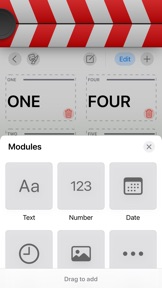
Tailor your board and create custom layouts to suit your unique style. Effortlessly rearrange the elements on the board using drag and drop, and easily add new modules from the library. Save your preferred layouts as templates to re-use. Built-in options for 'text', 'number', 'date', 'image' and 'clock'.
YOUR LOGO HERE
Showcase your own branding elements or logos on the board with the 'image' module, with full support for transparency. Theme your boards with various color options for the clapper.
LIBRARY MANAGEMENT
Work on multiple projects at once? Organize related boards into collections. Sync your library between iPhone and iPad using iCloud.
FREE TO TRY
Experience the full range of features for free, with a limited board library size. With a simple in-app purchase, unlock the library limit and make as many boards as you wish.
Whether capturing a viral social story, documenting an exciting road trip, or hoping to someday create the next blockbuster, Take One is the casual digital movie slate for you. Its simplicity and user-friendly features make it the ideal companion for aspiring filmmakers.
此版本中有什麼更新? (1.1.2)
• Fixes a crash at launch when connected to a mirrored external display
銷售商
名稱
Steven Troughton-Smith
資訊
版本
1.1.2
大小
8.1 MB
Game Center
否
VPP Device Licensing
是
喜好程度
分級:4+
相容性
iOS 15.0 或更新版本
裝置
iPhone 5s, iPhone 6, iPhone 6 Plus, iPhone 6s, iPhone 6s Plus, iPhone SE, iPhone 7, iPhone 7 Plus, iPhone 8, iPhone 8 Plus, iPhone X, iPhone XR, iPhone XS, iPhone XS Max, iPhone 11, iPhone 11 Pro, iPhone 11 Pro Max, iPhone SE(第 2 代), iPhone 12, iPhone 12 Pro, iPhone 12 Pro Max, iPhone 12 mini, iPhone 13, iPhone 13 Pro, iPhone 13 Pro Max, iPhone 13 mini, iPhone SE(第 3 代), iPhone 14, iPhone 14 Plus, iPhone 14 Pro, iPhone 14 Pro Max, iPhone 15, iPhone 15 Plus, iPhone 15 Pro, iPhone 15 Pro Max, iPhone 16, iPhone 16 Plus, iPhone 16 Pro, iPhone 16 Pro Max, iPhone 16e, iPhone 17, iPhone 17 Pro, iPhone 17 Pro Max, iPhone Air, iPhone 17e, iPad(第 5 代)Wi-Fi, iPad(第 5 代)Wi-Fi + Cellular, iPad(第 6 代)Wi-Fi, iPad(第 6 代)Wi-Fi + Cellular, iPad Pro, iPad Pro (Cellular), iPad Pro(9.7 英吋), iPad Pro(9.7 英吋)(Cellular), iPad Pro 12.9 英寸(第 2 代), iPad Pro 12.9 英寸(第 2 代) Wi-Fi + Cellular, iPad Pro(10.5 英寸), iPad Pro(10.5 英寸) Wi-Fi + Cellular, iPad Pro(11 英寸), iPad Pro(11 英寸) Wi-Fi + Cellular, iPad Pro 12.9 英寸(第 3 代), iPad Pro 12.9 英寸(第 3 代) Wi-Fi + Cellular, iPad Air, iPad Air (Cellular), iPad Air 2, iPad Air 2 (Cellular), iPad Air(第三代), iPad Air(第三代) Wi-Fi + Cellular, iPad mini Retina, iPad mini Retina (Cellular), iPad mini 3, iPad mini 3 (Cellular), iPad mini 4, iPad mini 4 (Cellular), iPad mini(第 5 代), iPad mini(第 5 代)Wi-Fi + Cellular, iPad(第 7 代)Wi-Fi + Cellular, iPad Pro(11 英寸,第 2 代), iPad Pro(11 英寸,第 2 代)(Wi-Fi + 行動網路), iPad Pro(12.9 英寸,第 4 代), iPad Pro(12.9 英寸,第 4 代)(Wi-Fi + 行動網路), iPad Air(第四代)(Wi-Fi), iPad Air(第四代)(Wi-Fi + Cellular), iPad(第 8 代)Wi-Fi, iPad(第 8 代)Wi-Fi + Cellular, iPad Pro(11 英寸,第 3 代), iPad Pro(11 英寸,第 3 代)(Wi-Fi + 行動網路), iPad Pro(12.9 英寸,第 5 代), iPad Pro(12.9 英寸,第 5 代)(Wi-Fi + 行動網路), iPad(第 9 代), iPad(第 9 代)Wi-Fi + Cellular, iPad mini(第 6 代), iPad mini(第 6 代)Wi-Fi + Cellular, iPad Air(第 5 代), iPad Air(第 5 代) Wi-Fi + Cellular, iPad Pro(11 英寸,第 4 代), iPad Pro(11 英寸,第 4 代)(Wi-Fi + 行動網路), iPad Pro(12.9 英寸,第 6 代), iPad Pro(12.9 英寸,第 6 代)(Wi-Fi + 行動網路), iPad(第 10 代), iPad(第 10 代)(Wi-Fi + 行動網路), iPad Air 11 吋(M2)Wi-Fi, iPad Air 13 吋(M2)Wi-Fi, iPad Air 13 吋(M2)Wi-Fi + 行動網路, iPad Pro 11 吋(M4)Wi-Fi, iPad Pro 11 吋(M4)Wi-Fi + 行動網路, iPad Pro 13 吋(M4)Wi-Fi, iPad Pro 13 吋(M4)Wi-Fi + 行動網路, iPad mini(A17 Pro)Wi-Fi, iPad mini(A17 Pro)Wi-Fi + 行動網路, iPad(A16,Wi-Fi), iPad(A16,Wi-Fi + 行動網路), iPad Air(11 吋,M3,Wi-Fi), iPad Air(11 吋,M3,Wi-Fi + 行動網路), iPad Air(13 吋,M3,Wi-Fi), iPad Air(13 吋,M3,Wi-Fi + 行動網路), iPad Pro 11 吋(M5)Wi-Fi, iPad Pro 11 吋(M5)Wi-Fi + 行動網路, iPad Pro 13 吋(M5)Wi-Fi, iPad Pro 13 吋(M5)Wi-Fi + 行動網路, iPad Air(11 吋,M4,Wi-Fi), iPad Air(11 吋,M4,Wi-Fi + 行動網路), iPad Air(13 吋,M4,Wi-Fi), iPad Air(13 吋,M4,Wi-Fi + 行動網路), iPod touch (第六代), iPod touch (第 7 代), Mac Desktop
語言
英文
App Store:評等
評分與評論
0.0/5 (無評分)
App Store:評論
無條目