說明
iCircuit is the premier iPhone and iPad app for designing, simulating, and learning analog and digital electronics. Its advanced simulation engine provides real-time, always-on analysis so your circuits stay powered and live, just like working with real components.
Use it like a CAD tool: add components, wire them up, and set their properties. But iCircuit is unlike typical CAD apps because it is always simulating. You do not stop to take a measurement or spend time configuring reports. Instead, you just play with the circuit as you normally would, with the power on.
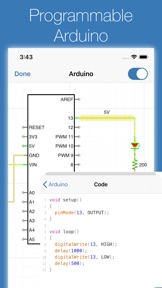
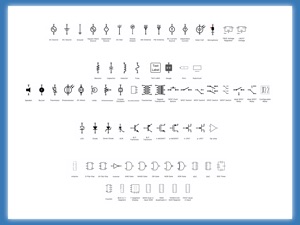
Build circuits with over 300 components, from simple resistors and LEDs to programmable Arduinos (Uno, Nano, Mega, ESP8266, ESP32), PIC microcontrollers, and 60 4000/7400-series digital ICs (more available with Pro). Connect elements, adjust values, and instantly see the results.
BUILT-IN TEST EQUIPMENT
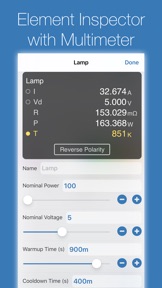
• Multimeter: Probe any point to read voltage, current, and power
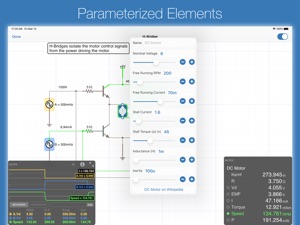
• Oscilloscope: Track multiple signals with touch-controlled time scale, stacked/unstacked views, FFT analysis, and Bode plots
• Gauges: Visualize voltages, currents, and frequencies directly in your circuit
• Signal generators and configurable sources
EXTENSIVE COMPONENT LIBRARY
• Programmable Arduinos (Uno, Nano, Mega, ESP8266, ESP32)
• Programmable PIC microcontrollers (assembly and HEX files, more available with Pro)
• Power: Voltage regulators (78xx, LM317), sources, dependent sources, power jacks, and simulated antennas
• Analog: Resistors, capacitors, inductors, diodes, BJTs, MOSFETs, thermistors, triodes, and tetrodes
• Digital: Logic gates (AND, OR, NAND, NOR, XOR), JK and D flip-flops, and 60 4000/7400-series ICs (180+ available with Pro)
• ADCs and DACs
• Sensors and displays: LEDs, 7-segment, NeoPixels, matrix displays, thermistors
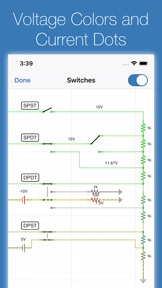
• Electromechanical: Motors, servos, SPST/SPDT and DPST/DPDT switches, push buttons, relays, and speakers
CREATE CUSTOM ELEMENTS
Build sub-circuits and custom elements to componentize your designs and create reusable modules. Share your custom elements with others via the iCircuit Gallery.
AUDIO SIMULATION
Hear your circuits. Speakers, buzzers, and microphones produce real audio output.
Perfect for students learning electronics, hobbyists prototyping projects, and engineers validating designs, all without burning out a single component.
ABOUT ICIRCUIT PRO (OPTIONAL)
iCircuit is a complete app with a one-time purchase. iCircuit Pro is optional and adds extra components (including more PICs and a larger 4000/7400 IC library) and helps fund ongoing development. Pro is not required for core simulation or everyday circuit design.
Terms of Use: https://www.apple.com/legal/internet-services/itunes/dev/stdeula/
此版本中有什麼更新? (1.15.2)
This small update fixes signing into the iCircuit Gallery to upload custom elements and fixes the link to the iCircuit Manual.
1.15.1: Fixes the lasso selection tool, fixes crashes on iOS 12 devices, fixes thumbnail generation, and it fixes the D12 port label on Arduino Nanos
# Version 1.5 Updates
This major update brings powerful new analysis tools, expanded microcontroller support, and numerous improvements.
## Bode Plot Analysis
Unlock frequency response analysis with new Bode plot capabilities! Visualize how your circuits respond across frequencies with magnitude and phase plots. Perfect for analyzing filters, amplifiers, and frequency-dependent circuits. See cutoff frequencies, gain characteristics, and phase relationships at a glance.
## Expanded Microcontroller Support
- **Arduino Mega** - Build bigger projects with 54 digital I/O pins and 16 analog inputs
- **Arduino Nano** - Compact board ideal for small-scale applications
- **ESP32 and ESP8266** - Enhanced support for popular IoT microcontrollers
## New Circuit Elements
- **AC Motor** - Single phase AC induction motor
- **Barrel Connector** - Professional DC power jack for your circuits with configurable shunt terminal
- **Improved Power Supply Jack** with better connection handling
## Quick Search
Find circuit elements faster than ever! New search bar lets you instantly locate components without scrolling through categories. Just start typing and get to building.
## Voltage Monitoring
Protect your circuits with automatic under-voltage and over-voltage warnings. Get notified when components are operating outside their safe voltage ranges, helping prevent damage to sensitive ICs and ensuring reliable operation.
## Element Library Organization
- New Microcontroller category for better organization
- Improved element filtering options
- Elements sorted by Pro availability for easier discovery
## Bug Fixes
- Fixed photodiode and photoresistor light source selection
- Removed false capacitor loop errors that prevented valid circuits from running
- Added input voltage tolerance for digital ICs to prevent spurious warnings from minor voltage fluctuations
- Better handling of Arduino EEPROM and multiple board types
Thank you for your continued support! Whether you're learning electronics, prototyping professional designs, or just having fun building circuits, we hope v1.15 makes your experience even better.