關於使用條款隱私政策聯絡
 
更新中
Photo Measures

Photo Measures

發行日期:2011-01-20
© Cubent
Photo Measures - QR碼
版本 4.7
4+
App Store 下載
版本 4.7
4+
App Store 下載
發行日期:2011-01-20
© Cubent

iPhone Screenshots

擷圖
擷圖
擷圖
擷圖
擷圖

iPad Screenshots

擷圖
擷圖
擷圖
擷圖
擷圖

說明

Photo Measures is the most elegant and the easiest way to save measures on your own photos on iPhone and iPad!
Architectural Digest - "Very useful when shopping or meeting with contractors"
Tuaw.com - "It's perfect for your own work around the house, and handy for creating plans to bring to a contractor"
AppSafari - "So incredibly convenient"
Featured on the front page of the AppStore under New & Noteworthy and Staff Favorites in more than 70 countries, including the US, France, Germany and Canada.
Recommended by many reference magazines, websites and blogs all around the world: Architectural Digest, Tuaw.com, This Old House, AppOfTheDay.com, AppSafari.com, etc...
◆◆◆◆◆
Constructing a house? Engineering a new project? Moving to a new place?
Take some photos and note down the dimensions on the photos to remember the exact layout, and to make sure that everything will fit easily.
Need to keep in mind the exact dimensions of an object? Just take a photo and quickly write them on it.
Are you decorating? Want to buy a new frame or a new furniture but not sure it will fit?
No problem since you can have all your house dimensions always with you!
◆◆◆◆◆
You are a real estate agent?
A contractor?
An engineer?
A designer?
Working in the construction industry?
Someone who wants to keep his house's measure easily accessible?
Whenever you need to save dimensions, sizes, angles or write down a detail you need to remember, Photo Measures will help you to be more efficient and more accurate.
◆◆◆◆◆
Photo Measures helps you to:
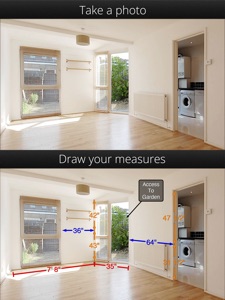
. Take a photo and directly draw measures on it
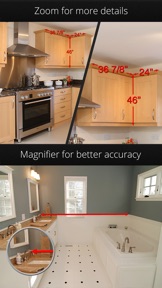
. Zoom into and out of your photo when you need more precision
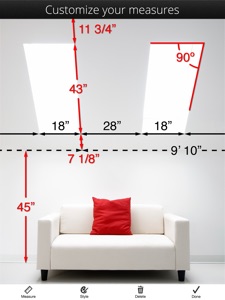
. Edit your measures with a very intuitive interface
. Quickly add text as comments when measures are not enough
. Native support for angles
. Save your measures in imperial or metric units
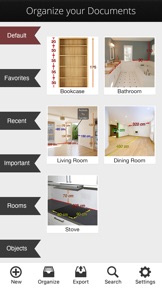
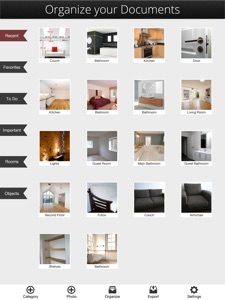
. Easily organize your photos by category
. Export your dimensions in high resolution by email or to the photo library
. Export as PDF or JPG
. Import photos of any size and aspect ratio
. Support Retina display
Keep posted, a lot of new features are planned for the next versions!

此版本中有什麼更新? (4.7)

Thank you all for your very positive feedback!
In this version:
- minor improvements and bug fixes

銷售商

名稱

Cubent SARL

資訊

開發人員

版本

4.7

大小

26.7 MB

Game Center

VPP Device Licensing

喜好程度

分級:4+

相容性

iOS 11.0 或更新版本

裝置

iPhone 5s, iPhone 6, iPhone 6 Plus, iPhone 6s, iPhone 6s Plus, iPhone SE, iPhone 7, iPhone 7 Plus, iPhone 8, iPhone 8 Plus, iPhone X, iPhone XR, iPhone XS, iPhone XS Max, iPhone 11, iPhone 11 Pro, iPhone 11 Pro Max, iPhone SE(第 2 代), iPhone 12, iPhone 12 Pro, iPhone 12 Pro Max, iPhone 12 mini, iPhone 13, iPhone 13 Pro, iPhone 13 Pro Max, iPhone 13 mini, iPhone SE(第 3 代), iPhone 14, iPhone 14 Plus, iPhone 14 Pro, iPhone 14 Pro Max, iPhone 15, iPhone 15 Plus, iPhone 15 Pro, iPhone 15 Pro Max, iPhone 16, iPhone 16 Plus, iPhone 16 Pro, iPhone 16 Pro Max, iPhone 16e, iPhone 17, iPhone 17 Pro, iPhone 17 Pro Max, iPhone Air, iPhone 17e, iPad(第 5 代)Wi-Fi, iPad(第 5 代)Wi-Fi + Cellular, iPad(第 6 代)Wi-Fi, iPad(第 6 代)Wi-Fi + Cellular, iPad Pro, iPad Pro (Cellular), iPad Pro(9.7 英吋), iPad Pro(9.7 英吋)(Cellular), iPad Pro 12.9 英寸(第 2 代), iPad Pro 12.9 英寸(第 2 代) Wi-Fi + Cellular, iPad Pro(10.5 英寸), iPad Pro(10.5 英寸) Wi-Fi + Cellular, iPad Pro(11 英寸), iPad Pro(11 英寸) Wi-Fi + Cellular, iPad Pro 12.9 英寸(第 3 代), iPad Pro 12.9 英寸(第 3 代) Wi-Fi + Cellular, iPad Air, iPad Air (Cellular), iPad Air 2, iPad Air 2 (Cellular), iPad Air(第三代), iPad Air(第三代) Wi-Fi + Cellular, iPad mini Retina, iPad mini Retina (Cellular), iPad mini 3, iPad mini 3 (Cellular), iPad mini 4, iPad mini 4 (Cellular), iPad mini(第 5 代), iPad mini(第 5 代)Wi-Fi + Cellular, iPad(第 7 代)Wi-Fi + Cellular, iPad Pro(11 英寸,第 2 代), iPad Pro(11 英寸,第 2 代)(Wi-Fi + 行動網路), iPad Pro(12.9 英寸,第 4 代), iPad Pro(12.9 英寸,第 4 代)(Wi-Fi + 行動網路), iPad Air(第四代)(Wi-Fi), iPad Air(第四代)(Wi-Fi + Cellular), iPad(第 8 代)Wi-Fi, iPad(第 8 代)Wi-Fi + Cellular, iPad Pro(11 英寸,第 3 代), iPad Pro(11 英寸,第 3 代)(Wi-Fi + 行動網路), iPad Pro(12.9 英寸,第 5 代), iPad Pro(12.9 英寸,第 5 代)(Wi-Fi + 行動網路), iPad(第 9 代), iPad(第 9 代)Wi-Fi + Cellular, iPad mini(第 6 代), iPad mini(第 6 代)Wi-Fi + Cellular, iPad Air(第 5 代), iPad Air(第 5 代) Wi-Fi + Cellular, iPad Pro(11 英寸,第 4 代), iPad Pro(11 英寸,第 4 代)(Wi-Fi + 行動網路), iPad Pro(12.9 英寸,第 6 代), iPad Pro(12.9 英寸,第 6 代)(Wi-Fi + 行動網路), iPad(第 10 代), iPad(第 10 代)(Wi-Fi + 行動網路), iPad Air 11 吋(M2)Wi-Fi, iPad Air 13 吋(M2)Wi-Fi, iPad Air 13 吋(M2)Wi-Fi + 行動網路, iPad Pro 11 吋(M4)Wi-Fi, iPad Pro 11 吋(M4)Wi-Fi + 行動網路, iPad Pro 13 吋(M4)Wi-Fi, iPad Pro 13 吋(M4)Wi-Fi + 行動網路, iPad mini(A17 Pro)Wi-Fi, iPad mini(A17 Pro)Wi-Fi + 行動網路, iPad(A16,Wi-Fi), iPad(A16,Wi-Fi + 行動網路), iPad Air(11 吋,M3,Wi-Fi), iPad Air(11 吋,M3,Wi-Fi + 行動網路), iPad Air(13 吋,M3,Wi-Fi), iPad Air(13 吋,M3,Wi-Fi + 行動網路), iPad Pro 11 吋(M5)Wi-Fi, iPad Pro 11 吋(M5)Wi-Fi + 行動網路, iPad Pro 13 吋(M5)Wi-Fi, iPad Pro 13 吋(M5)Wi-Fi + 行動網路, iPad Air(11 吋,M4,Wi-Fi), iPad Air(11 吋,M4,Wi-Fi + 行動網路), iPad Air(13 吋,M4,Wi-Fi), iPad Air(13 吋,M4,Wi-Fi + 行動網路), iPod touch (第六代), iPod touch (第 7 代)

語言

德文, 法文, 英文, 葡萄牙文, 西班牙文

App Store:評等

評分與評論

4.7/5 (9 評等)

App Store:評論

2015-09-18

Can it supports Bosch GLM100 ??

Can it supports Bosch GLM100 ??
Zapper C.
版本 3.8.4
2012-06-16

很方便

好用!採購家俱或擺飾用這個來記錄尺寸超方便。
喜愛藍天
版本 3.5
2011-10-01

實用!

好棒的軟體,我喜歡
Joyce0823
版本 3.3.1
2011-03-08

Question

I have taken many pictures,then want to mark size. But my finger is big than the both side points in the screen. If the picture could be zoom in and zoom out ,It should be more beter.
edwardlin037
版本 3.1