關於使用條款隱私政策聯絡
 
更新中
oneSafe password manager

oneSafe password manager

發行日期:2011-10-12
© Lunabee Pte Ltd
oneSafe password manager - QR碼
版本 5.0.12
4+
App Store 下載
版本 5.0.12
4+
App Store 下載
發行日期:2011-10-12
© Lunabee Pte Ltd

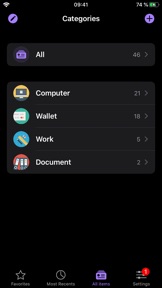
iPhone Screenshots

擷圖
擷圖
擷圖
擷圖
擷圖

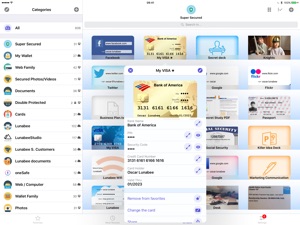
iPad Screenshots

擷圖
擷圖
擷圖
擷圖

說明

oneSafe is like Fort Knox in your pocket! oneSafe provides advanced security for your passwords.
NEW! oneSafe now supports Dark Mode and many other iOS 13 improvements.
You can even sync your secured info across various devices via iCloud Drive or Dropbox to have your passwords available whenever and wherever you need them.
oneSafe protects your confidential information with AES-256 encryption; the highest level of encryption on mobile devices. Passwords, documents, photos, credit card numbers, bank account details, PIN codes and much more can all be locked away securely inside your safe – and at the same time be accessible whenever you need them. Plus, oneSafe adapts to your preferences allowing you to change the colors and images of your safe for maximum customization.
> THEY LOVE oneSafe
• Apple Editor's Choice, best new app in 80 countries!
• "oneSafe has cuter graphics than its rivals" [New York Times]
• "Even though oneSafe is incredibly powerful, it remains incredibly user-friendly." [iMore]
• "Listed in top password managers" [Cnet]
• "oneSafe is well built, robust, and easy to use" [Marco Tabini]
• "If you want to protect and secure your data like Fort Knox, oneSafe is your solution." [AppDictions.com]
oneSafe is ultra secure, easy to use and provides an unequaled user experience. Keep all your confidential information secure and easily accessible when you need it – with oneSafe!
> SECURITY first
oneSafe incorporates the strongest encryption algorithm available on mobile devices (AES-256). All your data is automatically encrypted as soon as it's stored in the app, even the synched content. oneSafe also makes your entry password unhackable by using encryption standards involving extremely complex calculations.
> SYNC your content, the way you want
• You control at all times which categories are synched and which are not.
• Your info is synched via iCloud or Dropbox. Before being sent to the server, it’s encrypted with AES-256 for the maximum possible level of security.
• You don't want to use the cloud? Choose the manual sync option!
> FEATURES that will make your life easier
• iOS universal search in Spotlight.
• Large step-by-step password reader.
• Create, browse and edit your items super easily.
• Use ready-made templates to quickly and easily enter your data.
• Back up your data (via email, iTunes or Wi-Fi) to be sure you’ll always have a copy in storage.
• Change the texture, icon and color for any of your items.
• Flag items as 'Favorites' for quick access to your most commonly used information.
• Use the ‘Search’ feature to find items quickly within your database.
• Sync the content of your safe between your devices using iCloud and/or Dropbox.
• Use the bullet-proof "Secure sharing" feature to share your confidential data with your family, friends or colleagues.
Store in complete security:
• Credit card numbers
• PIN codes and entry codes
• Social security and tax numbers
• Bank account details
• Usernames and passwords
• Documents in PDF, Word, Excel and more
• Private photos and videos

此版本中有什麼更新? (5.0.12)

Fixes and improvements.

資訊

開發人員

類別

版本

5.0.12

大小

347.3 MB

Game Center

VPP Device Licensing

喜好程度

分級:4+

相容性

iOS 10.3 或更新版本

裝置

iPhone 5, iPhone 5c, iPhone 5s, iPhone 6, iPhone 6 Plus, iPhone 6s, iPhone 6s Plus, iPhone SE, iPhone 7, iPhone 7 Plus, iPhone 8, iPhone 8 Plus, iPhone X, iPhone XR, iPhone XS, iPhone XS Max, iPhone 11, iPhone 11 Pro, iPhone 11 Pro Max, iPhone SE(第 2 代), iPhone 12, iPhone 12 Pro, iPhone 12 Pro Max, iPhone 12 mini, iPad(第四代)(Wi-Fi), iPad(第四代)(4G), iPad(第 5 代)Wi-Fi, iPad(第 5 代)Wi-Fi + Cellular, iPad(第 6 代)Wi-Fi, iPad(第 6 代)Wi-Fi + Cellular, iPad Pro, iPad Pro (Cellular), iPad Pro(9.7 英吋), iPad Pro(9.7 英吋)(Cellular), iPad Pro 12.9 英寸(第 2 代), iPad Pro 12.9 英寸(第 2 代) Wi-Fi + Cellular, iPad Pro(10.5 英寸), iPad Pro(10.5 英寸) Wi-Fi + Cellular, iPad Pro(11 英寸), iPad Pro(11 英寸) Wi-Fi + Cellular, iPad Pro 12.9 英寸(第 3 代), iPad Pro 12.9 英寸(第 3 代) Wi-Fi + Cellular, iPad Air, iPad Air (Cellular), iPad Air 2, iPad Air 2 (Cellular), iPad Air(第三代), iPad Air(第三代) Wi-Fi + Cellular, iPad mini Retina, iPad mini Retina (Cellular), iPad mini 3, iPad mini 3 (Cellular), iPad mini 4, iPad mini 4 (Cellular), iPad mini(第 5 代), iPad mini(第 5 代)Wi-Fi + Cellular, iPad(第 7 代)Wi-Fi + Cellular, iPad Pro(11 英寸,第 2 代), iPad Pro(11 英寸,第 2 代)(Wi-Fi + 行動網路), iPad Pro(12.9 英寸,第 4 代), iPad Pro(12.9 英寸,第 4 代)(Wi-Fi + 行動網路), iPad Air(第四代)(Wi-Fi), iPad Air(第四代)(Wi-Fi + Cellular), iPad(第 8 代)Wi-Fi, iPad(第 8 代)Wi-Fi + Cellular, iPad Pro(11 英寸,第 3 代), iPad Pro(11 英寸,第 3 代)(Wi-Fi + 行動網路), iPad Pro(12.9 英寸,第 5 代), iPad Pro(12.9 英寸,第 5 代)(Wi-Fi + 行動網路), iPod touch (第六代), iPod touch (第 7 代), Apple Watch Series 4, Apple Watch Series 5, Apple Watch Series 6(GPS), Apple Watch Series 6(GPS + 行動網路), Apple Watch Series SE(GPS), Apple Watch Series SE(GPS + 行動網路)

語言

中文, 俄文, 德文, 日文, 法文, 波蘭文, 義大利文, 英文, 葡萄牙文, 西班牙文, 韓文

App Store:評等

評分與評論

2.3/5 (3 評等)

App Store:評論

2019-12-07

Lost password

I updated today and the password I set requires a white color, but I don't know it's because night mode or something else there's no white when I try to log in.
Plz fix this problem or help me out ASAP , I really like this app since it helps me a lot.
依嫻控
版本 5.0.3
2017-01-22

nice

:)
弱肝玩家
版本 3.4.1
2016-11-19

Very good!

Good App!
Still great!
wei-hsiang
版本 3.6.2
2016-10-29

Synchronizing problem

It seems ALL of my data were lost after I try to synchronize between iPhone and iPad.
Dndjfiekjjskseijf
版本 3.2.2
2016-10-15

韓文

韓文是殺毀?
Eric7744
版本 3.6.3
2016-10-15

希望有繁體中文

功能很棒很好用,但是語言設定希望能有教學,不或是app內能有設定的功能直接做切換。
沒有中文的人可以到設定-一般-語言與地區-偏好的語言順序中加入簡體中文,然後把簡體中文放在英文的前面順位,這樣進入app時就會變簡體中文。會顯示什麼語言就看你的順位怎麼排,日文在前頭就會變日文。繁中放在前面卻沒顯示,就表示這app目前尚未支援這個語言。
Gerald C.
版本 3.1.1
2016-10-12

版本說明有中文?但下載後沒中文?

沒有中文欸
Angel_x_13
版本 3.5.0
2016-08-27

方便安全

好用,拍攝卡的功能有改進
黃瓜
2016-04-22

袂歹用

水啦
Jacktrain
2016-04-19

不錯的保管箱

私心希望相片有隨機播放幻燈片的功能!
牛肉麵9527
2016-03-22

中文的設定到底在哪邊沒看到啊

中文的設定到底在哪邊沒看到啊
哪招啊⋯⋯
2016-03-18

其實有中文

Ios 9.3 beta 7會顯示英文 ios9.2.1是中文。 還沒出的作業系統就不要求了
xSoppx
2016-03-17

請問怎麼改中文

3Q
曾奕帆
2016-03-17

very useful

good
robber_10
2016-03-16

I. love it

很精美,很漂亮,很好用!
Yuan Baby
2016-03-16

誰說沒中文的

说沒中文的,該看看眼科
skylght
2016-03-14

Nice app

Good
Kunpe
2016-03-14

說好的中文呢

語言明明有寫中文
Skyline39
2016-03-14

Great

Great
Claire1688
2016-03-14

good

nice app
eric1069
2016-03-14

非常實用

讚!
Lilypurple713
2016-03-13

中文呢?

看不台灣人民?不要來嗎?下載ㄧ開頁面就是英文,讓我又去下載兩個翻譯,翻譯的我攏看沒有,全刪了,但是你們不要用騙的騙人下載!
a86663645
2016-03-13

全英文

全都英文連這是什麼都不知道
爛爛爛爛爛爛爛爛XXX
2016-03-13

Nice tool

Excellent
Vanolambo
2016-03-13

Great

Awesome app. However, it doesn't contain language selection.
月光男孩
2016-03-13

語言

想說英文可以加減看的懂...可是開啟是日文啊!!xDD 沒中文好歹英文,不辭要用日語呀~~~
Twotwolokenz
2016-03-12

Good

Perfect
Josh Pi
2016-03-12

繁體中文

可以推出繁體中文版嗎?
LPH1204
2016-03-12

good

good
gxz xxx
2016-03-12

Good

好用
九尾火影
2016-03-12

不错

是我想要的东西
哈哈哈看坎坎坷坷
2016-03-12

Great

Yes
Si Chang ccccc
2016-03-11

沒中文

語言寫有中文但找不到地方設定啊??
賽先生
2016-03-11

Good

👍🏻👍🏻👍🏻👍🏻👍🏻
Mr.RyanYang
版本 3.4.1
2016-03-11

沒有正體中文了嗎?

因為文字減少了使用動機,只能給三星
幾米吳
2016-03-11

好用 但希望可以有中文呀
Kevin Yen
2016-03-09

Nice

Nice
蘇竺雯
2016-03-09

好用

讚~
風水之家
2015-08-07

改板就沒中文了

太不人道了
阿修羅霸王拳
2015-07-25

改版變英文

原本的版本設定頁面是中文,更新後怎麼全變英文。
亞峻
2015-04-08

為什麼更新之後原本有繁體中文卻都變成英文了?

為什麼更新之後原本有繁體中文卻都變成英文了?
Sharikezo