關於使用條款隱私政策聯絡
 
更新中
JRemote

JRemote

發行日期:2011-12-21
© 2025 JRiver, Inc.
JRemote - QR碼
版本 3.45
4+
App Store 下載
版本 3.45
4+
App Store 下載
發行日期:2011-12-21
© 2025 JRiver, Inc.

iPhone Screenshots

擷圖
擷圖
擷圖
擷圖
擷圖
擷圖
擷圖
擷圖

iPad Screenshots

擷圖
擷圖
擷圖
擷圖
擷圖
擷圖

說明

JRemote is a full featured native iOS remote for JRiver Media Center. JRemote was developed to offer you full remote control of your JRiver Media Center from any of your iDevices.
Please note that you need JRiver Media Center version 15 or later. We recommend you always run the latest version.
Features and specs:
Universal app
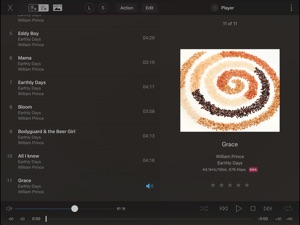
JRemote is a universal iOS application. The application will run on both iPhone/iPod touch as well as iPad’s. Each version is optimized for it`s screen size.
Navigation
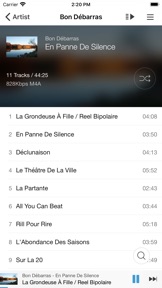
JRemote uses the navigation setup from JRMC itself. This allows you to customize the navigation menu and sub-menus from within the JRiver application.
- Multiple view modes (list, imagelist, thumbnails)
- Search using JRMC`s fuzzy search engine
- Virtual remote for controlling theater view
DLNA and zones
Use JRemote to control all your DLNA supported devices. Any device supported in JRMC can be controlled from JRemote by switching to that specific zone.
You can link and unlink zone for multi-room playback.
Easy setup
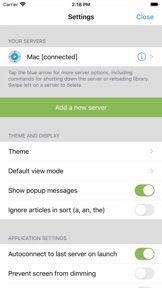
Connecting to your computer is fully automatic, no need to enter your IP-address and Port number.
You only need to enter the access key found in JRMC`s option panel (We do provide an option for you to add IP-address and Port manually if needed).
- JRemote will let you connect to your server from outside your wifi, using standard mobile networks. For this to work you need to configure port forwarding on your internet router.
- Wake-On-LAN is supported if you provide your machines MAC address. (Automatic when adding a server by access key)
- JRemote is CarPlay enabled.
Edit and view metadata
Any metadata attached to a specific file can be viewed and edited. You can update multiple files in one operation.
Rating may be set from multiple locations depending on iPhone/iPad version.
Player controls
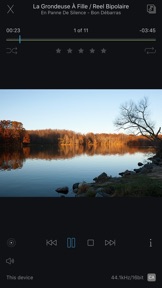
JRemote includes all common playback controls including repeat mode, and shuffle mode.
Control volume and progress from sliders while getting feedback from the HUD display
Audio streaming
JRemote lets you stream all your audio files to the device itself. Just select “This device” as the current zone.
- Gapless playback
- Stream any file up to 96kHz, 24 bit
- Downloaded progress indicator
- Supported formats include FLAC, ALAC, AIFF, MP3, OGG, AAC and WAV.
- All files may be transcoded from 128Kbs up to 320Kbs

此版本中有什麼更新? (3.45)

Image playback to the local iDevice can do a slideshow (timer is in settings)
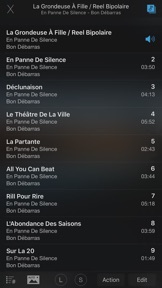
Centered cover art in Playing Now on iPhones.Fixes:Crashes and formatting on iOS/iPadOS 26Info in playing now will use 2 lines if necessary and all of the text has been moved up a bit.The download progress bar is displayed closer to the position slider bar and hides when the download of the track being played is complete.The letter bar has been resized so all of the letters are visible.

銷售商

名稱

JRiver, Inc.

資訊

開發人員

類別

版本

3.45

大小

136.7 MB

Game Center

VPP Device Licensing

喜好程度

分級:4+

相容性

iOS 9.3 或更新版本

裝置

iPhone 4S, iPhone 5, iPhone 5c, iPhone 5s, iPhone 6, iPhone 6 Plus, iPhone 6s, iPhone 6s Plus, iPhone SE, iPhone 7, iPhone 7 Plus, iPhone 8, iPhone 8 Plus, iPhone X, iPhone XR, iPhone XS, iPhone XS Max, iPhone 11, iPhone 11 Pro, iPhone 11 Pro Max, iPhone SE(第 2 代), iPhone 12, iPhone 12 Pro, iPhone 12 Pro Max, iPhone 12 mini, iPhone 13, iPhone 13 Pro, iPhone 13 Pro Max, iPhone 13 mini, iPhone SE(第 3 代), iPhone 14, iPhone 14 Plus, iPhone 14 Pro, iPhone 14 Pro Max, iPhone 15, iPhone 15 Plus, iPhone 15 Pro, iPhone 15 Pro Max, iPhone 16, iPhone 16 Plus, iPhone 16 Pro, iPhone 16 Pro Max, iPhone 16e, iPhone 17, iPhone 17 Pro, iPhone 17 Pro Max, iPhone Air, iPhone 17e, iPad 2(Wi-Fi), iPad 2(3G), iPad(第三代)(Wi-Fi), iPad(第三代)(4G), iPad(第四代)(Wi-Fi), iPad(第四代)(4G), iPad(第 5 代)Wi-Fi, iPad(第 5 代)Wi-Fi + Cellular, iPad(第 6 代)Wi-Fi, iPad(第 6 代)Wi-Fi + Cellular, iPad Pro, iPad Pro (Cellular), iPad Pro(9.7 英吋), iPad Pro(9.7 英吋)(Cellular), iPad Pro 12.9 英寸(第 2 代), iPad Pro 12.9 英寸(第 2 代) Wi-Fi + Cellular, iPad Pro(10.5 英寸), iPad Pro(10.5 英寸) Wi-Fi + Cellular, iPad Pro(11 英寸), iPad Pro(11 英寸) Wi-Fi + Cellular, iPad Pro 12.9 英寸(第 3 代), iPad Pro 12.9 英寸(第 3 代) Wi-Fi + Cellular, iPad Air, iPad Air (Cellular), iPad Air 2, iPad Air 2 (Cellular), iPad Air(第三代), iPad Air(第三代) Wi-Fi + Cellular, iPad mini (Wi-Fi), iPad mini (4G), iPad mini Retina, iPad mini Retina (Cellular), iPad mini 3, iPad mini 3 (Cellular), iPad mini 4, iPad mini 4 (Cellular), iPad mini(第 5 代), iPad mini(第 5 代)Wi-Fi + Cellular, iPad(第 7 代)Wi-Fi + Cellular, iPad Pro(11 英寸,第 2 代), iPad Pro(11 英寸,第 2 代)(Wi-Fi + 行動網路), iPad Pro(12.9 英寸,第 4 代), iPad Pro(12.9 英寸,第 4 代)(Wi-Fi + 行動網路), iPad Air(第四代)(Wi-Fi), iPad Air(第四代)(Wi-Fi + Cellular), iPad(第 8 代)Wi-Fi, iPad(第 8 代)Wi-Fi + Cellular, iPad Pro(11 英寸,第 3 代), iPad Pro(11 英寸,第 3 代)(Wi-Fi + 行動網路), iPad Pro(12.9 英寸,第 5 代), iPad Pro(12.9 英寸,第 5 代)(Wi-Fi + 行動網路), iPad(第 9 代), iPad(第 9 代)Wi-Fi + Cellular, iPad mini(第 6 代), iPad mini(第 6 代)Wi-Fi + Cellular, iPad Air(第 5 代), iPad Air(第 5 代) Wi-Fi + Cellular, iPad Pro(11 英寸,第 4 代), iPad Pro(11 英寸,第 4 代)(Wi-Fi + 行動網路), iPad Pro(12.9 英寸,第 6 代), iPad Pro(12.9 英寸,第 6 代)(Wi-Fi + 行動網路), iPad(第 10 代), iPad(第 10 代)(Wi-Fi + 行動網路), iPad Air 11 吋(M2)Wi-Fi, iPad Air 13 吋(M2)Wi-Fi, iPad Air 13 吋(M2)Wi-Fi + 行動網路, iPad Pro 11 吋(M4)Wi-Fi, iPad Pro 11 吋(M4)Wi-Fi + 行動網路, iPad Pro 13 吋(M4)Wi-Fi, iPad Pro 13 吋(M4)Wi-Fi + 行動網路, iPad mini(A17 Pro)Wi-Fi, iPad mini(A17 Pro)Wi-Fi + 行動網路, iPad(A16,Wi-Fi), iPad(A16,Wi-Fi + 行動網路), iPad Air(11 吋,M3,Wi-Fi), iPad Air(11 吋,M3,Wi-Fi + 行動網路), iPad Air(13 吋,M3,Wi-Fi), iPad Air(13 吋,M3,Wi-Fi + 行動網路), iPad Pro 11 吋(M5)Wi-Fi, iPad Pro 11 吋(M5)Wi-Fi + 行動網路, iPad Pro 13 吋(M5)Wi-Fi, iPad Pro 13 吋(M5)Wi-Fi + 行動網路, iPad Air(11 吋,M4,Wi-Fi), iPad Air(11 吋,M4,Wi-Fi + 行動網路), iPad Air(13 吋,M4,Wi-Fi), iPad Air(13 吋,M4,Wi-Fi + 行動網路), iPod touch(第五代), iPod touch (第六代), iPod touch (第 7 代), Apple Watch Series 4, Apple Watch Series 5, Apple Watch Series 6(GPS), Apple Watch Series 6(GPS + 行動網路), Apple Watch Series SE(GPS), Apple Watch Series SE(GPS + 行動網路), Apple Watch Series 7(GPS), Apple Watch Series 7(GPS + 行動網路), Apple Watch Series 8(GPS), Apple Watch Series 8(GPS + 行動網路), Apple Watch SE(第 2 代) (GPS), Apple Watch SE(第 2 代) (GPS + 行動網路), Apple Watch Ultra, Apple Watch Series 9(GPS), Apple Watch Series 9(GPS + 行動網路), Apple Watch Ultra 2, Apple Watch Series 10(GPS), Apple Watch Series 10(GPS + 行動網路), Apple Watch Series 11(GPS), Apple Watch Series 11(GPS + 行動網路), Apple Watch SE 3(GPS), Apple Watch SE 3(GPS + 行動網路), Apple Watch Ultra 3(GPS + 行動網路)

語言

挪威波克默爾文, 法文, 英文

App Store:評等

評分與評論

0.0/5 (無評分)

App Store:評論

2019-04-24

Very Good

配合JRiver Media Center 使用介面設計的很美、音樂資訊非常豐富、而且JRemote遙控反應非常快速是一種Very Nice的APP.
hk97060
2018-12-23

Very convenient app!

It is very easy to use.
milkschiit
版本 3.28
2018-11-27

Too slow

Each action takes at least 10 seconds to get response from computer. Please improve it.
Ktliao88
版本 3.25
2016-05-29

volume control and lyrics support

suggest to have volume controlled by iPhone not sw itself when sound is out through "player", and support lyrics would be a plus. Appreciated!
Liam Lu
版本 1.50
2015-12-04

JRemote

Easy to use, great interface
Johnney T
版本 3.22
2012-03-04

Great

Great
Allen1234567chen