更新中


iPhone Screenshots




iPad Screenshots


說明
The most popular meme maker app, with
over 10 million downloads!
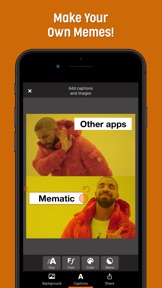
Add captions to photos and videos. Use your own images or access a large collection of memes, free premium photos and gifs directly from the app.
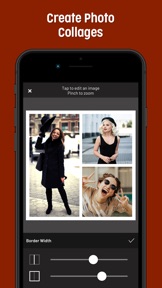
Create collages with the new layout tools - combine your best photos in beautiful frames. Use filters to create the perfect mood.
Mematic is more than a Meme maker: Create inspirational quotes, tell a quick story, comment on news, celebrate an achievement, sell your car, crack a joke ...
It's fast and easy: With a few taps you can add captions to any picture and share them with your friends.
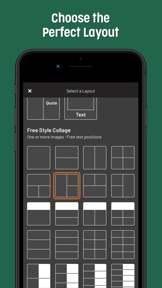
Create the perfect layout in Mematic - you can freely arrange text, images and stickers. If you prefer, choose one of the quick styles to create modern and classic memes within seconds.
Share all your creations with your friends, directly from Mematic: Share on WhatsApp, Telegram and Signal, or upload to Instagram and Facebook within seconds - it's super easy!
Mematic is the meme maker app you were looking for. Become the best meme creator in your favorite subreddit within minutes!
Mematic respects your privacy:
• Mematic does not track you.
• Mematic does not show any third party advertisements.
• All memes that you create with Mematic are private. Nobody will get access to them until you share them by yourself.
---------------------
You can subscribe for unlimited access to all Pro features offered within Mematic. Subscriptions are billed monthly ("Mematic Pro Monthly") or annually ("Mematic Pro Yearly") at the rate selected depending on the subscription plan.
While you are subscribed, all Pro features in the app are unlocked, and all advertisements are removed. The Pro features include access to all collage layouts, fonts, all text colors, a custom color mixer and custom watermarks.
Your subscription will be charged through your iTunes Account at confirmation of purchase. Your subscription automatically renews unless you turn it off in Account Settings at least 24 hours before the end of the billing period. Your account will be charged for renewal within 24 hours prior to the end of the current period. You can manage the subscription, and turn off the auto-renewal by going to your Account Settings after purchase. Any unused portion of a free trial period will be forfeited if you purchase a subscription. By using this app, you agree to our privacy policy and to our terms of use.
Read the terms of use for this app at https://mematic.net/terms.html
Read the privacy policy for this app at https://mematic.net/privacy.html
此版本中有什麼更新? (3.2.1)
This update introduces a new UI for the editor. Now it's much easier to combine and select the text styles that you need for your designs. Choose ready-made styles for your memes and social media posts from the Presets menu.
Activate the "Expert mode" to see all new layout and typography features from this Update:
• Fully customizable shadows
• Nudge items
• Snap items to canvas center
• Set leading and tracking for text items
• Blend mode support for text items
• New blend modes
• Improved color and font selection
• Add shadow, borders and rounded corners to stickers
• A new Flow Backdrop style
• Corner and alignment settings for text outlines
• Send items to front and back
• Duplicate items
You can activate the Expert mode in the "More" menu. Some of the new features require a Pro subscription.
If you have any questions about this update, feel free to send me an email with the "Feedback" and "Support" options in the app.
New in 3.2.1:
• Fixes a bug where opacity and blend mode options would not be unlocked for some users that purchased a legacy upgrade
• Fixes a bug where All Caps options would not be visible for some meme layouts
A system framework in iOS responsible for video rendering contains a bug which causes exports of high resolution videos (4k) to fail frequently. As a workaround, the size of exported videos will be limited to HD until the underlying issue is resolved with a future iOS update.
銷售商
名稱
Theodor Mueller
資訊
開發人員
類別
版本
3.2.1
大小
30.7 MB
Game Center
否
VPP Device Licensing
是
喜好程度
Rated 12+ for the following:
偶而/輕微的酒精、菸草或藥物使用或相關內容
偶而/輕微的卡通或幻想暴力
偶而/輕微的現實暴力
偶而/輕微的色情內容與裸露
偶而/輕微的成人/性暗示題材
頻繁/強烈的粗話或低俗幽默
相容性
iOS 12.0 或更新版本
裝置
iPhone 5s, iPhone 6, iPhone 6 Plus, iPhone 6s, iPhone 6s Plus, iPhone SE, iPhone 7, iPhone 7 Plus, iPhone 8, iPhone 8 Plus, iPhone X, iPhone XR, iPhone XS, iPhone XS Max, iPhone 11, iPhone 11 Pro, iPhone 11 Pro Max, iPhone SE(第 2 代), iPhone 12, iPhone 12 Pro, iPhone 12 Pro Max, iPhone 12 mini, iPad(第 5 代)Wi-Fi, iPad(第 5 代)Wi-Fi + Cellular, iPad(第 6 代)Wi-Fi, iPad(第 6 代)Wi-Fi + Cellular, iPad Pro, iPad Pro (Cellular), iPad Pro(9.7 英吋), iPad Pro(9.7 英吋)(Cellular), iPad Pro 12.9 英寸(第 2 代), iPad Pro 12.9 英寸(第 2 代) Wi-Fi + Cellular, iPad Pro(10.5 英寸), iPad Pro(10.5 英寸) Wi-Fi + Cellular, iPad Pro(11 英寸), iPad Pro(11 英寸) Wi-Fi + Cellular, iPad Pro 12.9 英寸(第 3 代), iPad Pro 12.9 英寸(第 3 代) Wi-Fi + Cellular, iPad Air, iPad Air (Cellular), iPad Air 2, iPad Air 2 (Cellular), iPad Air(第三代), iPad Air(第三代) Wi-Fi + Cellular, iPad mini Retina, iPad mini Retina (Cellular), iPad mini 3, iPad mini 3 (Cellular), iPad mini 4, iPad mini 4 (Cellular), iPad mini(第 5 代), iPad mini(第 5 代)Wi-Fi + Cellular, iPad(第 7 代)Wi-Fi + Cellular, iPad Pro(11 英寸,第 2 代), iPad Pro(11 英寸,第 2 代)(Wi-Fi + 行動網路), iPad Pro(12.9 英寸,第 4 代), iPad Pro(12.9 英寸,第 4 代)(Wi-Fi + 行動網路), iPad Air(第四代)(Wi-Fi), iPad Air(第四代)(Wi-Fi + Cellular), iPad(第 8 代)Wi-Fi, iPad(第 8 代)Wi-Fi + Cellular, iPad Pro(11 英寸,第 3 代), iPad Pro(11 英寸,第 3 代)(Wi-Fi + 行動網路), iPad Pro(12.9 英寸,第 5 代), iPad Pro(12.9 英寸,第 5 代)(Wi-Fi + 行動網路), iPod touch (第六代), iPod touch (第 7 代)
語言
德文, 英文
App Store:評等
評分與評論
4.5/5 (31 評等)
App Store:評論
無條目