更新中


±0
#61在Top Paid iPad Apps > 導航
iPhone Screenshots


iPad Screenshots



說明
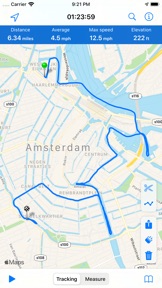
MapPath is an easy-to-use app allowing you to record your trips.
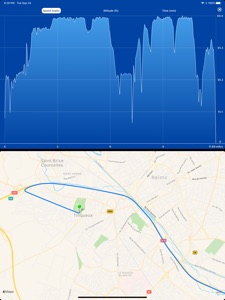
It displays your track, your position and live information such as your speed, altitude or average speed.
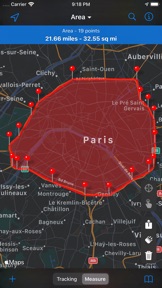
MapPath is also an utility that allows you to establish directions, measure distances, surface areas and perimeters by dragging pins (points) on the map.
# GPS Tracker Features :
- record your run: time, distance, altitude, speed, average speed
- pause and resume recording as needed
- display your track on the map
- display charts of your altitude, speed and pace
- location and heading tracking
- cut portion of the track
- display simultaneously several tracks on the map
- change color of each track on the map
# Measures Features :
- directions up to 30 steps
- measure distances, surface areas and perimeters using pins (points) on the map
- add point to your measure by taping and holding the map
- display simultaneously several measures on the map
- change color of each measure on the map
# Import / Export Features :
- import and export tracks and measures as KML, KMZ, ITN, GPX and CSV files
# Options :
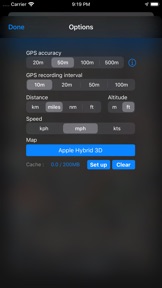
- gps accuracy options
- system of units options
- map types selection : Apple standard & satellite (3D) maps, OpenStreetMap, OpenSeaMap
# And also :
- Dark Mode on iOS 13
- Split View and Slide Over multitasking on iPad
- Widget displaying informations about your current location or current tracking
MapPath use iCloud to automatically keep in sync your tracks and measures across your devices.
If you have any problem, suggestion, please feel free to contact me at contact@julienroze.fr
Note that continued use of GPS running in the background can dramatically decrease battery life.
此版本中有什麼更新? (7.1)
MapPath 7.1 :
- Fix crashes when trying to export track and measure
MapPath 7.0 :
- Display several tracks and measures simultaneously on the map. A new screen is available to show tracks and measures currently displayed on the map so you can switch easily between each track/measure.
- Improved tracks/measures screen with search system, keywords and sort
- Export several tracks or measures at once using the new multi-select feature
- Change the color of your tracks and measures
- Improved iCloud sync
銷售商
名稱
Julien Roze
資訊
開發人員
類別
版本
7.1
大小
13.4 MB
Game Center
否
VPP Device Licensing
是
喜好程度
分級:4+
相容性
iOS 11.0 或更新版本
裝置
iPhone 5s, iPhone 6, iPhone 6 Plus, iPhone 6s, iPhone 6s Plus, iPhone SE, iPhone 7, iPhone 7 Plus, iPhone 8, iPhone 8 Plus, iPhone X, iPhone XR, iPhone XS, iPhone XS Max, iPhone 11, iPhone 11 Pro, iPhone 11 Pro Max, iPhone SE(第 2 代), iPad(第 5 代)Wi-Fi, iPad(第 5 代)Wi-Fi + Cellular, iPad(第 6 代)Wi-Fi, iPad(第 6 代)Wi-Fi + Cellular, iPad Pro, iPad Pro (Cellular), iPad Pro(9.7 英吋), iPad Pro(9.7 英吋)(Cellular), iPad Pro 12.9 英寸(第 2 代), iPad Pro 12.9 英寸(第 2 代) Wi-Fi + Cellular, iPad Pro(10.5 英寸), iPad Pro(10.5 英寸) Wi-Fi + Cellular, iPad Pro(11 英寸), iPad Pro(11 英寸) Wi-Fi + Cellular, iPad Pro 12.9 英寸(第 3 代), iPad Pro 12.9 英寸(第 3 代) Wi-Fi + Cellular, iPad Air, iPad Air (Cellular), iPad Air 2, iPad Air 2 (Cellular), iPad Air(第三代), iPad Air(第三代) Wi-Fi + Cellular, iPad mini Retina, iPad mini Retina (Cellular), iPad mini 3, iPad mini 3 (Cellular), iPad mini 4, iPad mini 4 (Cellular), iPad mini(第 5 代), iPad mini(第 5 代)Wi-Fi + Cellular, iPad(第 7 代)Wi-Fi + Cellular, iPad Pro(11 英寸,第 2 代), iPad Pro(11 英寸,第 2 代)(Wi-Fi + 行動網路), iPad Pro(12.9 英寸,第 4 代), iPad Pro(12.9 英寸,第 4 代)(Wi-Fi + 行動網路), iPod touch (第六代), iPod touch (第 7 代)
語言
法文, 英文
App Store:評等
評分與評論
0.0/5 (無評分)
App Store:評論
無條目