關於使用條款隱私政策聯絡
 
更新中
eDrawings Pro

eDrawings Pro

發行日期:2012-08-31
© 1999-2024 Dassault Systemes SolidWorks Corporation
eDrawings Pro - QR碼
版本 34.2.0057
4+
App Store 下載
版本 34.2.0057
4+
App Store 下載
發行日期:2012-08-31
© 1999-2024 Dassault Systemes SolidWorks Corporation

iPhone Screenshots

擷圖
擷圖
擷圖

iPad Screenshots

擷圖

說明

eDrawings® Pro is the professional 2D and 3D CAD collaboration app for the iPad, iPhone and iPod Touch that can view native SolidWorks® files (part, assembly, drawings), eDrawings files and DraftSight® (DWG™, DXF™) files. You can easily view models and access configurations, drawing sheets, and exploded views for eDrawings files published from SolidWorks and all other supported CAD software.
Markup! Measure! Section! eDrawings® Pro takes you to the next level of 2D and 3D collaboration with more functionality, including dynamic cross section views, measurements, markups & annotations and the unique ability to share it all by email!
eDrawings includes Augmented Reality (AR). This allows you to view your 3D models in 1:1 scale into the real world. By simply activating the device’s camera, you can bring your virtual 3D designs in a real context and see them in situ, sitting on your desk or on your conference room table or even in the palm of your hand, through your iPad, Pad mini, iPhone or iPod Touch’s screen. Move around the room and see your design from any perspective.
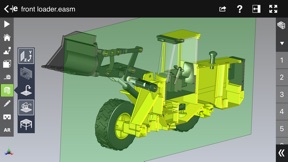
With an intuitive user interface, eDrawings® Pro enables you to dynamically view cross sections of your models in XY, YZ, or ZX directions from both sides and easily drag the cross section plane on screen or with a convenient slider. You can also measure distances in your designs, with easy-to-use selection filters for faces, edges, vertices and holes.
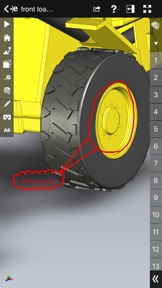
With eDrawings® Pro you can create markups on your drawings, including text notes, freehand notations, dimensions, cross-section views, photos and camera snapshots.
You can share your marked up eDrawings files with others for review and further comments. All markups with history are saved within the eDrawings file.
Features:
* Intuitive and easy-to-use user interface
* Visualize your 3D models in real context with Augmented Reality (AR)
* Open 3D (EASM, EPRT, SLDASM, SLDPRT, IGES, IGS, JT, STEP, STP, IFC), 2D (EDRW, SLDDRW, DWG, DXF) and associated files from any source: email attachments, cloud storage services (Dropbox™, SkyDrive®, Google Drive, YouSendIt®, and others), web and FTP sites, networks, and iTunes® File Sharing.
* Zoom, pan, and rotate your 3D and 2D CAD data using multi-touch
* Browse your assembly components tree, model configurations and drawing sheets
* Hide, show, or make components transparent
* Select View mode: standard orthogonal views, shaded with edges, perspective view
* Play animated 3D standard views as well as 2D drawing views
* View your designs in full screen and double tap to fit it on screen
* Double tap zooms to drawing views
* Markup your designs and send to others and read others’ markups
* Measure your design data
* View cross sections of your 3D designs, even in AR mode
* Adapt the scale of your 3D model in AR mode
* Freeze the background in AR mode with viewpoint lock to prolong AR experience without holding up your device.
* Sample files included
For more information, visit:
http://www.edrawingsviewer.com

此版本中有什麼更新? (34.2.0057)

Bug Fixes

銷售商

名稱

Dassault Systemes SolidWorks Corporation

資訊

版本

34.2.0057

大小

202.2 MB

Game Center

VPP Device Licensing

喜好程度

分級:4+

相容性

iOS 16.0 或更新版本

裝置

iPhone 5s, iPhone 6, iPhone 6 Plus, iPhone 6s, iPhone 6s Plus, iPhone SE, iPhone 7, iPhone 7 Plus, iPhone 8, iPhone 8 Plus, iPhone X, iPhone XR, iPhone XS, iPhone XS Max, iPhone 11, iPhone 11 Pro, iPhone 11 Pro Max, iPhone SE(第 2 代), iPhone 12, iPhone 12 Pro, iPhone 12 Pro Max, iPhone 12 mini, iPhone 13, iPhone 13 Pro, iPhone 13 Pro Max, iPhone 13 mini, iPhone SE(第 3 代), iPhone 14, iPhone 14 Plus, iPhone 14 Pro, iPhone 14 Pro Max, iPhone 15, iPhone 15 Plus, iPhone 15 Pro, iPhone 15 Pro Max, iPhone 16, iPhone 16 Plus, iPhone 16 Pro, iPhone 16 Pro Max, iPhone 16e, iPhone 17, iPhone 17 Pro, iPhone 17 Pro Max, iPhone Air, iPhone 17e, iPad(第 5 代)Wi-Fi, iPad(第 5 代)Wi-Fi + Cellular, iPad(第 6 代)Wi-Fi, iPad(第 6 代)Wi-Fi + Cellular, iPad Pro, iPad Pro (Cellular), iPad Pro(9.7 英吋), iPad Pro(9.7 英吋)(Cellular), iPad Pro 12.9 英寸(第 2 代), iPad Pro 12.9 英寸(第 2 代) Wi-Fi + Cellular, iPad Pro(10.5 英寸), iPad Pro(10.5 英寸) Wi-Fi + Cellular, iPad Pro(11 英寸), iPad Pro(11 英寸) Wi-Fi + Cellular, iPad Pro 12.9 英寸(第 3 代), iPad Pro 12.9 英寸(第 3 代) Wi-Fi + Cellular, iPad Air, iPad Air (Cellular), iPad Air 2, iPad Air 2 (Cellular), iPad Air(第三代), iPad Air(第三代) Wi-Fi + Cellular, iPad mini Retina, iPad mini Retina (Cellular), iPad mini 3, iPad mini 3 (Cellular), iPad mini 4, iPad mini 4 (Cellular), iPad mini(第 5 代), iPad mini(第 5 代)Wi-Fi + Cellular, iPad(第 7 代)Wi-Fi + Cellular, iPad Pro(11 英寸,第 2 代), iPad Pro(11 英寸,第 2 代)(Wi-Fi + 行動網路), iPad Pro(12.9 英寸,第 4 代), iPad Pro(12.9 英寸,第 4 代)(Wi-Fi + 行動網路), iPad Air(第四代)(Wi-Fi), iPad Air(第四代)(Wi-Fi + Cellular), iPad(第 8 代)Wi-Fi, iPad(第 8 代)Wi-Fi + Cellular, iPad Pro(11 英寸,第 3 代), iPad Pro(11 英寸,第 3 代)(Wi-Fi + 行動網路), iPad Pro(12.9 英寸,第 5 代), iPad Pro(12.9 英寸,第 5 代)(Wi-Fi + 行動網路), iPad(第 9 代), iPad(第 9 代)Wi-Fi + Cellular, iPad mini(第 6 代), iPad mini(第 6 代)Wi-Fi + Cellular, iPad Air(第 5 代), iPad Air(第 5 代) Wi-Fi + Cellular, iPad Pro(11 英寸,第 4 代), iPad Pro(11 英寸,第 4 代)(Wi-Fi + 行動網路), iPad Pro(12.9 英寸,第 6 代), iPad Pro(12.9 英寸,第 6 代)(Wi-Fi + 行動網路), iPad(第 10 代), iPad(第 10 代)(Wi-Fi + 行動網路), iPad Air 11 吋(M2)Wi-Fi, iPad Air 13 吋(M2)Wi-Fi, iPad Air 13 吋(M2)Wi-Fi + 行動網路, iPad Pro 11 吋(M4)Wi-Fi, iPad Pro 11 吋(M4)Wi-Fi + 行動網路, iPad Pro 13 吋(M4)Wi-Fi, iPad Pro 13 吋(M4)Wi-Fi + 行動網路, iPad mini(A17 Pro)Wi-Fi, iPad mini(A17 Pro)Wi-Fi + 行動網路, iPad(A16,Wi-Fi), iPad(A16,Wi-Fi + 行動網路), iPad Air(11 吋,M3,Wi-Fi), iPad Air(11 吋,M3,Wi-Fi + 行動網路), iPad Air(13 吋,M3,Wi-Fi), iPad Air(13 吋,M3,Wi-Fi + 行動網路), iPad Pro 11 吋(M5)Wi-Fi, iPad Pro 11 吋(M5)Wi-Fi + 行動網路, iPad Pro 13 吋(M5)Wi-Fi, iPad Pro 13 吋(M5)Wi-Fi + 行動網路, iPad Air(11 吋,M4,Wi-Fi), iPad Air(11 吋,M4,Wi-Fi + 行動網路), iPad Air(13 吋,M4,Wi-Fi), iPad Air(13 吋,M4,Wi-Fi + 行動網路), iPod touch (第六代), iPod touch (第 7 代)

語言

英文

App Store:評等

評分與評論

2.2/5 (6 評等)

App Store:評論

2024-04-09

無法開檔

Iphone12 無法開起檔案
Rabeanco
版本 6.1.0
2021-10-05

對於Solidworks設計師是很方便的溝通工具

很方便
張瀚文
版本 3.0.1
2021-02-23

Hope to have the function of moving parts

Hope to have the function of moving parts
kiwi0606
版本 4.0.1
2020-11-18

Why does my iPad air 2 not work after upgrading to iOS14?

Why does my iPad air 2 not work after upgrading to iOS14?
David BORE
版本 8.1.6
2020-09-21

不能量尺寸

根本是詐欺
功能表根本沒有量尺寸的功能
希望多點漫畫
版本 9.4.1
2020-09-19

Startup crash

Startup crash in iOS 14/ iPhone X
Togoyu01
版本 3.2.0
2020-04-24

Weight?

Where can I see the weight of my sample?
Tony2020tw
版本 5.0.0
2019-04-02

能支援x_t格式嗎?

如題
一起玩吧++++++++
版本 9.0.9
2019-01-23

可以趕快更新嗎?

目前使用solidwork pro 2019,手機部分的軟體是否可以同步更新,不然手機會無法看到檔案內容
JANE.Su
版本 32.2.0064
2019-01-23

2019 solidworks檔案轉出後無法開啟⋯

2019 silidworks檔案轉出後無法開啟
Aerowei
版本 7.2.7
2017-12-23

不支援2016請快更新!

不支援2016請儘快跟新!
lan_cathy
版本 6.0.3
2017-09-04

無法載入檔案

原本在Google drive等應用程式的"在其他應徵用程式開啟"列表中edrawings的選項不見了,從程式內也沒有去抓雲端空間檔案的路徑,搞什麼鬼?!
快一年了還是沒有修復這個問題,退錢啦,爛死了
回覆一個目前無法從google drive輸入檔案是有幫到忙嗎?又過了一個月還是沒辦法用,PTC都要笑了。
cdrhujet
版本 3.3.1
2016-08-31

都無法下載使用,請不要被騙

連下載都不行
氣到爆000088888
版本 8.1.7
2016-05-12

2016版本打不開

2016 的版本打不開,請趕快更新!目前最新版的一樣打不開 2016 soild works
菜雞爸爸
版本 9.2.1
2015-11-17

This is cool that iPhone can open edrawing file

Cool, but take too many step to open file,
langusl
2013-11-29

I can't open my file

I can't open my file.
Fghhjjkk
2013-05-19

How I can get my file in?

I send my zip file to my mailbox. This zip file contains a .swb file. When I open the zip file by Winzip of iPhone, I can't "Open in" to eDrawing Pro. It means I can't find a way to get my file to eDrawing Pro. Please fix this bug. Otherwise, eDrawing is just a tool to view sample only, not my file.
期待能夠改善
2013-03-06

天啊!怎麼導入檔案?Gee, How should I import the file from Google Drive?

Hello All,
天啊!怎麼導入檔案?我找不到途徑從GoogleDrive 抓檔案。(說實在,我找不到任何途徑來導入檔案。)Gee, How should I import the file from Google Drive? Actually, I find cannot find any way to import files.
Mario Stone