說明
Valence 3D is a new powerful, beautiful & easy-to-use 3D modeler & design tool built from the ground up for iPad & iPhone. No matter whether you're learning 3D modeling for the first time or a professional working in design, construction, gaming, web dev, digital fabrication, architecture, or spatial computing, Valence 3D has what you need to get started!
CREATE, IMPORT, EDIT & EXPORT 3D MODELS
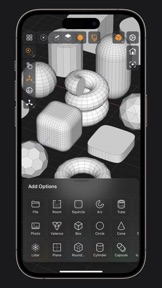
• 25 primitive shapes are built-in & ready to help you start modeling: plane, box, sphere, squircle, rounded box, arc, circle, cylinder, tube, cone, capsule, torus, icosphere, pipe, revolve, helix, voronoi, text, super shape, noise surfaces, torus knot, faceted gem & tube.
• Import existing models, reference images, lidar scans and room plans
• Imports: OBJ, STL, USD, USDZ
• Exports: PNG, SVG, OBJ, STL, USD, USDZ, GLTF, GLB
• Knife tool to create complex and detailed geometry
• Move, Rotate, & Scale gizmos make it easy to transform nodes, faces, edges & vertices
• Powerful modeling gizmos for extruding, insetting, beveling, poking, creasing & cutting
• Multiple selection & automatic loop selection help accelerate your modeling
• Tap on one of the gizmo handles to bring up an input field for precise transformations & mesh operations
• Robust snapping & alignment commands
• Selection operations: grow, shrink, select shell & deselect
• Mesh operations: duplicate, instance, set / center pivot, trim by plane, boolean, apply transform & subdivide
• Face operations: separate, combine, bridge, extract, poke, collapse, delete, dissolve, harden & soften
• Edge operations: extrude, insert vertex, collapse, dissolve, bridge, harden & soften
• Vertex operations: insert edge, dissolve, delete & merge
• Non-destructive & configurable mesh modifiers: mirror & subdivision
• Apply complex transformations using different gizmo pivot points & orientations
EASILY NAVIGATE & STAY IN FLOW WHILE DESIGNING
• Carefully crafted & fully optimized for iPhone & iPad
• Designed to minimize cognitive overload by only showing tools & commands that are contextually relevant
• Easily navigate to any part of your model by dragging and pinching: two finger pinch to zoom and roll, and one finger drag to rotate
• Pop into the standard orthographic views by tapping one of the handles of the orientation gizmo
• Use two & three finger tap gestures to undo & redo
• Select components by dragging or using the rectangular selection mode
• Your work is saved automatically every two minutes and every time you go back to the gallery
• Get an overview of your scene’s structure from the Outliner
• Long press on a node in the Outliner to easily rename, duplicate, instance, delete, parent & reorder any object in your scene
• Precisely adjust any node’s position, rotation & scale with the Inspector
• Adjust material properties, display & modifier options with the Inspector
STAY ORGANIZED ACROSS ALL YOUR DEVICES
• Preview, share, duplicate, delete & rename your models from the gallery
• iCloud syncing keeps all your models up to date, private & accessible across all your devices
PREVIEW, MEASURE, & RENDER YOUR CREATIONS
• 6 powerful rendering modes: Matcap, Modeling, Wireframe, Physically Based, X-Ray & Path Traced
• Export renders in any aspect ratio & scale
• Preview your model in AR in two taps
• Export your scene as a USDZ & be confident it’ll look consistent on all Apple devices
• Tweak your model’s material & see changes in real-time
• Tweak-able scene settings: camera field of view, background type, blurriness, intensity & rotation
• Get model measurements in one click
• Add persistent dimensions between any two surfaces in your scene
PURCHASE & COMPATIBILITY
• One time purchase unlocks both iPhone & iPad versions
• Apple Pencil supported on select iPads
• 120 FPS supported on devices with ProMotion displays
• Path Tracing is supported on iPads with M series chips & iPhones with A15 Bionic & later
• Lidar Scan & Room Plan is supported on devices with a lidar sensor