關於使用條款隱私政策聯絡
 
更新中
PhotoTiling

PhotoTiling

發行日期:2013-07-01
© EyeTap Soft
PhotoTiling - QR碼
版本 1.5.1
4+
App Store 下載
版本 1.5.1
4+
App Store 下載
發行日期:2013-07-01
© EyeTap Soft

iPhone Screenshots

擷圖
擷圖
擷圖
擷圖
擷圖

說明

"The well-known InstaTiling app is now PhotoTiling"
** Tile banners and photo grids on your Instagram profile **
New: The app was previously named "InstaTiling". It has been renamed to "PhotoTiling" for meeting Instagram's brand policy.
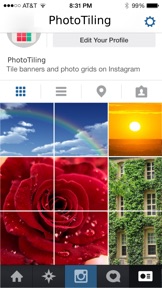
PhotoTiling is an app that enables you to crop your photos into multiple squares (tiles), then arrange them on your Instagram profile page to create Banners and Photo Grids. PhotoTiling not only enables you to easily and quickly make banners, but also provides you the maximum flexibility to tile your photos into any grid pattern you want. Besides uploading to Instagram, you can also save your Banner/PhotoGrid as a single photo.
** Features :
1. Load multiple photos, crop your input photos into multiple squares, then arrange and post them on Instagram as banner or any grid pattern you want. (see Screenshot 1,2,5),
2. Add tags, captions, and comments to the cropped photos within the app, and you can copy the tags to all other cropped photos with just one button tap (see Screenshot 3).
3. The UI is optimized for you to quickly and easily make banners. The "Fit" function can automatically fit your loaded photo into the squares you have selected.
4. Upload the cropped photos to Instagram in the correct order from within the app. The app will track which cropped photos have been uploaded so that you won't forget what should be the next one to upload (see Screenshot 4,5)
5. You can also save the cropped photos to your camera roll, then upload them later in Instagram.
6. You can save the created Banner/PhotoGrid as one single photo to Camera Roll.
** Tips:
1. To make large banners (e.g. 4x3 banner), you can use two-finger tap to quickly select multiple squares.
2. You can use the "Fit" function to quickly fit your loaded photo into the squares that you have selected.
3. Use "Save Grid" function to save the created Banner/PhotoGrid as one single photo to Camera Roll.
** Note:
1. Due to the constraints of Instagram API, currently you can only upload the cropped photos one at a time during "upload".
2. The tags or comments added within the app are only effective when you use the "upload" function. If you use the "save Tiles" function and use Instagram to upload from camera roll, you can only add tags within the Instagram app.
*****
Visit @Instatiling on Instagram for featured user profiles (upcoming), update info, and samples etc.
Visit #InstaTilingApp to see other users' InstaTilings
Visit our website : www.eyetapsoft.com

此版本中有什麼更新? (1.5.1)

This update from Apple will improve the functionality of this app. No new features are included.
1. The name of the app has changed from "InstaTiling" to "PhotoTiling", for conforming with Instagram's brand policy (Insta now is registered brand name by Instagram).
2. Fixed a bug that results in strange photo zooming problem when you pinch the screen or use the "Fit" function.

銷售商

名稱

Eyetap Soft LLC

資訊

開發人員

版本

1.5.1

大小

2.9 MB

Game Center

VPP Device Licensing

喜好程度

分級:4+

相容性

iOS 6.0 或更新版本

裝置

iPhone 3GS, iPhone 4, iPhone 4S, iPhone 5, iPhone 5c, iPhone 5s, iPhone 6, iPhone 6 Plus, iPhone 6s, iPhone 6s Plus, iPhone SE, iPhone 7, iPhone 7 Plus, iPhone 8, iPhone 8 Plus, iPhone X, iPhone XR, iPhone XS, iPhone XS Max, iPhone 11, iPhone 11 Pro, iPhone 11 Pro Max, iPhone SE(第 2 代), iPhone 12, iPhone 12 Pro, iPhone 12 Pro Max, iPhone 12 mini, iPhone 13, iPhone 13 Pro, iPhone 13 Pro Max, iPhone 13 mini, iPhone SE(第 3 代), iPhone 14, iPhone 14 Plus, iPhone 14 Pro, iPhone 14 Pro Max, iPhone 15, iPhone 15 Plus, iPhone 15 Pro, iPhone 15 Pro Max, iPhone 16, iPhone 16 Plus, iPhone 16 Pro, iPhone 16 Pro Max, iPhone 16e, iPhone 17, iPhone 17 Pro, iPhone 17 Pro Max, iPhone Air, iPhone 17e, iPad 2(Wi-Fi), iPad 2(3G), iPad(第三代)(Wi-Fi), iPad(第三代)(4G), iPad(第四代)(Wi-Fi), iPad(第四代)(4G), iPad(第 5 代)Wi-Fi, iPad(第 5 代)Wi-Fi + Cellular, iPad(第 6 代)Wi-Fi, iPad(第 6 代)Wi-Fi + Cellular, iPad Pro, iPad Pro (Cellular), iPad Pro(9.7 英吋), iPad Pro(9.7 英吋)(Cellular), iPad Pro 12.9 英寸(第 2 代), iPad Pro 12.9 英寸(第 2 代) Wi-Fi + Cellular, iPad Pro(10.5 英寸), iPad Pro(10.5 英寸) Wi-Fi + Cellular, iPad Pro(11 英寸), iPad Pro(11 英寸) Wi-Fi + Cellular, iPad Pro 12.9 英寸(第 3 代), iPad Pro 12.9 英寸(第 3 代) Wi-Fi + Cellular, iPad Air, iPad Air (Cellular), iPad Air 2, iPad Air 2 (Cellular), iPad Air(第三代), iPad Air(第三代) Wi-Fi + Cellular, iPad mini (Wi-Fi), iPad mini (4G), iPad mini Retina, iPad mini Retina (Cellular), iPad mini 3, iPad mini 3 (Cellular), iPad mini 4, iPad mini 4 (Cellular), iPad mini(第 5 代), iPad mini(第 5 代)Wi-Fi + Cellular, iPad(第 7 代)Wi-Fi + Cellular, iPad Pro(11 英寸,第 2 代), iPad Pro(11 英寸,第 2 代)(Wi-Fi + 行動網路), iPad Pro(12.9 英寸,第 4 代), iPad Pro(12.9 英寸,第 4 代)(Wi-Fi + 行動網路), iPad Air(第四代)(Wi-Fi), iPad Air(第四代)(Wi-Fi + Cellular), iPad(第 8 代)Wi-Fi, iPad(第 8 代)Wi-Fi + Cellular, iPad Pro(11 英寸,第 3 代), iPad Pro(11 英寸,第 3 代)(Wi-Fi + 行動網路), iPad Pro(12.9 英寸,第 5 代), iPad Pro(12.9 英寸,第 5 代)(Wi-Fi + 行動網路), iPad(第 9 代), iPad(第 9 代)Wi-Fi + Cellular, iPad mini(第 6 代), iPad mini(第 6 代)Wi-Fi + Cellular, iPad Air(第 5 代), iPad Air(第 5 代) Wi-Fi + Cellular, iPad Pro(11 英寸,第 4 代), iPad Pro(11 英寸,第 4 代)(Wi-Fi + 行動網路), iPad Pro(12.9 英寸,第 6 代), iPad Pro(12.9 英寸,第 6 代)(Wi-Fi + 行動網路), iPad(第 10 代), iPad(第 10 代)(Wi-Fi + 行動網路), iPad Air 11 吋(M2)Wi-Fi, iPad Air 13 吋(M2)Wi-Fi, iPad Air 13 吋(M2)Wi-Fi + 行動網路, iPad Pro 11 吋(M4)Wi-Fi, iPad Pro 11 吋(M4)Wi-Fi + 行動網路, iPad Pro 13 吋(M4)Wi-Fi, iPad Pro 13 吋(M4)Wi-Fi + 行動網路, iPad mini(A17 Pro)Wi-Fi, iPad mini(A17 Pro)Wi-Fi + 行動網路, iPad(A16,Wi-Fi), iPad(A16,Wi-Fi + 行動網路), iPad Air(11 吋,M3,Wi-Fi), iPad Air(11 吋,M3,Wi-Fi + 行動網路), iPad Air(13 吋,M3,Wi-Fi), iPad Air(13 吋,M3,Wi-Fi + 行動網路), iPad Pro 11 吋(M5)Wi-Fi, iPad Pro 11 吋(M5)Wi-Fi + 行動網路, iPad Pro 13 吋(M5)Wi-Fi, iPad Pro 13 吋(M5)Wi-Fi + 行動網路, iPad Air(11 吋,M4,Wi-Fi), iPad Air(11 吋,M4,Wi-Fi + 行動網路), iPad Air(13 吋,M4,Wi-Fi), iPad Air(13 吋,M4,Wi-Fi + 行動網路), iPod touch(第四代), iPod touch(第五代), iPod touch (第六代), iPod touch (第 7 代)

語言

英文

App Store:評等

評分與評論

2.2/5 (14 評等)

App Store:評論

2019-03-05

騙錢 ?下載了 不能用?

騙錢 ?下載了 不能用?
vikhdd
2018-12-25

Can’t connect my instagram

I can’t upload photos automatically in the App
Ludansniper
版本 1.4
2017-10-23

更新後完全不能用

It's death after update:(
Rss113
版本 1.2.2
2016-11-04

不好用

難用
陳俊雄
版本 1.5.1
2016-05-25

It doesn't work

It doesn't work. Please fix the app or refund my money immediately!
Lollipop cat 543
2015-10-02

Can't open it!

Can't open it but costed NT.30
Kellychangtpe
2015-08-05

騙錢喔不能用啊
Lunayuuuuuuu
2014-05-26

無法裁切

無法裁切
Suriis3
2013-10-22

滿好用的,但有中文版嗎

1.能否多影片功能?
2.格子部份放進去是否可以設定圖層的型式,類似剪貼呢?
3.中文版?
Jay0975305010
2013-10-21

^^

So cool
萱Amy
2013-08-12

🐛好

好棒
吳蟲