關於使用條款隱私政策聯絡
 
更新中
AppSheet

AppSheet

發行日期:2013-11-01
© Google Inc
AppSheet - QR碼
版本 17.1
4+
App Store 下載
版本 17.1
4+
App Store 下載
發行日期:2013-11-01
© Google Inc

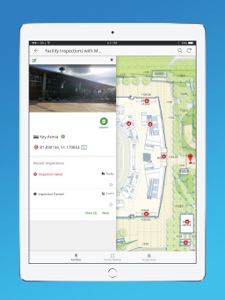
iPhone Screenshots

擷圖
擷圖
擷圖

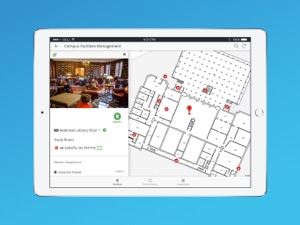
iPad Screenshots

擷圖
擷圖
擷圖
擷圖
擷圖
擷圖

說明

With AppSheet, you can create and distribute your own custom mobile apps without writing code or hiring developers. These apps can display content, take notes, create forms, capture photos, signatures and GPS, scan bar codes, and generate workflows for a wide variety of business scenarios. You can also build web apps and chatbots.
AppSheet uses data from your cloud storage -- Google Sheets, Excel on Office365, Dropbox or Box, Smartsheet, SalesForce, and a variety of databases (SQLServer, mySQL, Postgres, and DynamoDB). You can create an app in minutes and enhance it to create rich custom apps for your team, business, or enterprise. Check review sites like Capterra to learn how AppSheet’s modern technology platform outpaces older low-code solutions like PowerApps, Salesforce1, and App Maker.
AppSheet is an ideal solution for many business, including those in property management, agriculture, supply chain, operations, salesforce management, education and more. Here are just a few scenarios:
WORKING WITH REMOTE TEAMS
Apps built with AppSheet can help a remote team work with centralized data saved in spreadsheets (eg: in Google Drive, Box, or Droppox) or SQL databases.
PROJECT MANAGEMENT
Millions of people manage projects using Google Sheets, Excel, and Smartsheets. Project managers can build apps with AppSheet to display and share project data through a mobile device with other team members and stakeholders. Keep data centralized in a core spreadsheet and share only the parts that their audience needs to see. No more managing dozens of files that go back and forth via email!
EDUCATION
Manage study plans, school rosters, grading, and group work by creating a custom app with charts, maps, text summaries and image galleries. Share the app securely with students and colleagues.
CUSTOMER SUPPORT AND ENGAGEMENT:
Keep track of your customer pipeline on a Google Sheet but get the benefits of a streamlined custom mobile app using AppSheet. You can also interact with your data in new ways like building maps from your data, calling or messaging to telephone numbers, sending emails to contacts, and building catalogs using image galleries.

此版本中有什麼更新? (17.1)

Bug Fixes

銷售商

名稱

Solvebot Inc.

資訊

開發人員

版本

17.1

大小

38 MB

Game Center

VPP Device Licensing

喜好程度

分級:4+

相容性

iOS 12.0 或更新版本

裝置

iPhone 5s, iPhone 6, iPhone 6 Plus, iPhone 6s, iPhone 6s Plus, iPhone SE, iPhone 7, iPhone 7 Plus, iPhone 8, iPhone 8 Plus, iPhone X, iPhone XR, iPhone XS, iPhone XS Max, iPhone 11, iPhone 11 Pro, iPhone 11 Pro Max, iPhone SE(第 2 代), iPhone 12, iPhone 12 Pro, iPhone 12 Pro Max, iPhone 12 mini, iPhone 13, iPhone 13 Pro, iPhone 13 Pro Max, iPhone 13 mini, iPhone SE(第 3 代), iPhone 14, iPhone 14 Plus, iPhone 14 Pro, iPhone 14 Pro Max, iPhone 15, iPhone 15 Plus, iPhone 15 Pro, iPhone 15 Pro Max, iPhone 16, iPhone 16 Plus, iPhone 16 Pro, iPhone 16 Pro Max, iPhone 16e, iPhone 17, iPhone 17 Pro, iPhone 17 Pro Max, iPhone Air, iPhone 17e, iPad(第 5 代)Wi-Fi, iPad(第 5 代)Wi-Fi + Cellular, iPad(第 6 代)Wi-Fi, iPad(第 6 代)Wi-Fi + Cellular, iPad Pro, iPad Pro (Cellular), iPad Pro(9.7 英吋), iPad Pro(9.7 英吋)(Cellular), iPad Pro 12.9 英寸(第 2 代), iPad Pro 12.9 英寸(第 2 代) Wi-Fi + Cellular, iPad Pro(10.5 英寸), iPad Pro(10.5 英寸) Wi-Fi + Cellular, iPad Pro(11 英寸), iPad Pro(11 英寸) Wi-Fi + Cellular, iPad Pro 12.9 英寸(第 3 代), iPad Pro 12.9 英寸(第 3 代) Wi-Fi + Cellular, iPad Air, iPad Air (Cellular), iPad Air 2, iPad Air 2 (Cellular), iPad Air(第三代), iPad Air(第三代) Wi-Fi + Cellular, iPad mini Retina, iPad mini Retina (Cellular), iPad mini 3, iPad mini 3 (Cellular), iPad mini 4, iPad mini 4 (Cellular), iPad mini(第 5 代), iPad mini(第 5 代)Wi-Fi + Cellular, iPad(第 7 代)Wi-Fi + Cellular, iPad Pro(11 英寸,第 2 代), iPad Pro(11 英寸,第 2 代)(Wi-Fi + 行動網路), iPad Pro(12.9 英寸,第 4 代), iPad Pro(12.9 英寸,第 4 代)(Wi-Fi + 行動網路), iPad Air(第四代)(Wi-Fi), iPad Air(第四代)(Wi-Fi + Cellular), iPad(第 8 代)Wi-Fi, iPad(第 8 代)Wi-Fi + Cellular, iPad Pro(11 英寸,第 3 代), iPad Pro(11 英寸,第 3 代)(Wi-Fi + 行動網路), iPad Pro(12.9 英寸,第 5 代), iPad Pro(12.9 英寸,第 5 代)(Wi-Fi + 行動網路), iPad(第 9 代), iPad(第 9 代)Wi-Fi + Cellular, iPad mini(第 6 代), iPad mini(第 6 代)Wi-Fi + Cellular, iPad Air(第 5 代), iPad Air(第 5 代) Wi-Fi + Cellular, iPad Pro(11 英寸,第 4 代), iPad Pro(11 英寸,第 4 代)(Wi-Fi + 行動網路), iPad Pro(12.9 英寸,第 6 代), iPad Pro(12.9 英寸,第 6 代)(Wi-Fi + 行動網路), iPad(第 10 代), iPad(第 10 代)(Wi-Fi + 行動網路), iPad Air 11 吋(M2)Wi-Fi, iPad Air 13 吋(M2)Wi-Fi, iPad Air 13 吋(M2)Wi-Fi + 行動網路, iPad Pro 11 吋(M4)Wi-Fi, iPad Pro 11 吋(M4)Wi-Fi + 行動網路, iPad Pro 13 吋(M4)Wi-Fi, iPad Pro 13 吋(M4)Wi-Fi + 行動網路, iPad mini(A17 Pro)Wi-Fi, iPad mini(A17 Pro)Wi-Fi + 行動網路, iPad(A16,Wi-Fi), iPad(A16,Wi-Fi + 行動網路), iPad Air(11 吋,M3,Wi-Fi), iPad Air(11 吋,M3,Wi-Fi + 行動網路), iPad Air(13 吋,M3,Wi-Fi), iPad Air(13 吋,M3,Wi-Fi + 行動網路), iPad Pro 11 吋(M5)Wi-Fi, iPad Pro 11 吋(M5)Wi-Fi + 行動網路, iPad Pro 13 吋(M5)Wi-Fi, iPad Pro 13 吋(M5)Wi-Fi + 行動網路, iPad Air(11 吋,M4,Wi-Fi), iPad Air(11 吋,M4,Wi-Fi + 行動網路), iPad Air(13 吋,M4,Wi-Fi), iPad Air(13 吋,M4,Wi-Fi + 行動網路), iPod touch (第六代), iPod touch (第 7 代)

語言

英文

App Store:評等

評分與評論

3.1/5 (34 評等)

App Store:評論

2026-06-10

可以用,但是在優化上稍顯不足

整體而言來說是好用的,更能很實在,但是太容易卡了,感覺不怎麼舒服,再來就是沒有支援其他語言,對國外而言不友善。
Leon Liao0813
版本 16.7
2026-04-14

一直轉,完全無法儲存

如上
A222aaaaa2000
版本 11.3
2025-06-22

存儲速度變慢了

原本一直很不錯,最近存儲速度變很慢。所以少給一顆星
Allen_kang
版本 13.10
2025-02-04

工作內容的欄位不見了

重新下載也只有備註欄位可以填寫2025/1/24開始有問題…
Poland1970
版本 16.5
2021-08-18

Thank you, it’s very userfully tools

I appreciate all your effort
Alias360tw
版本 17.1
2018-12-26

Excellent

Very convenient and easy to use.
I like it.
Raiy Kuo
版本 16.9