更新中


iPhone Screenshots
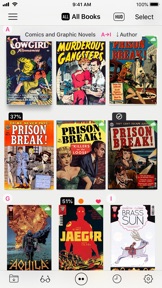


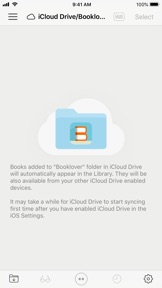
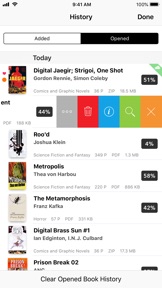


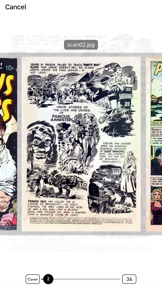
iPad Screenshots



說明
Booklover - comic/ebook reader (CBZ/ZIP, CBR/RAR, PDF)
Booklover is a highly responsive ebook reader with rich user interface.
The metadata-driven library management makes it easy to enjoy large number of books.
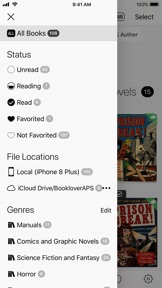
With the Library Navigator, you can instantly find a book even in a library with thousands of books.
With its powerful iCloud Drive integration, you can download and access your books from your iCloud Drive enabled devices anytime you want.
Supported file formats: PDF, CBZ/ZIP/CBR/RAR with archived images
* Characteristics
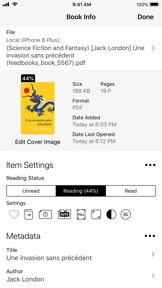
1. Powerful metadata-driven book management
• Set metadata to your books: Title, Author, Genre, Date Published, Publisher, ISBN code, and others
• Auto-extract metadata from filename of books - Extract strings enclosed in brackets as metadata automatically
• Search/Sort/filter books flexibly by different criteria
• Add arbitrary Tags to a book for filtering
2. Library for easy and quick access to your books
• Robust iCloud Drive integration for ubiquitous access to your books
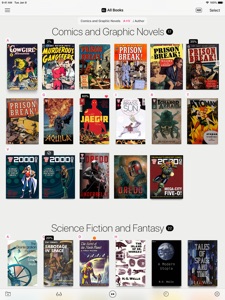
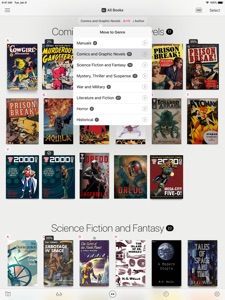
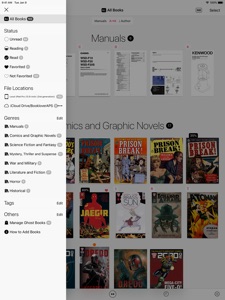
• Section books by genre (ON/OFF)
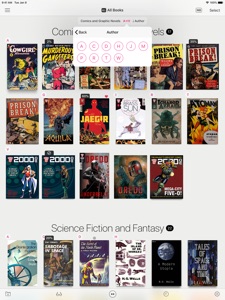
• The Library Navigator helps you quickly find a book even in a massive library
• Alphabetical index labels to locate a book quickly (ON/OFF)
• HUD overlay to display attributes of books (Grid View, ON/OFF)
• Quick access to books via History (Added/Opened)
• Auto crop wide-sized book covers
• "Responsive Shadow" - Renders book shadow based on the page count (ON/OFF)
3. Reading View to maximize immersion into the contents
• Book Settings Menu instantly accessible to change various settings of the book (ON/OFF)
• Skimming mode for fast book navigation, with larger page snapshots
• Quickly close a book by swiping up the screen (ON/OFF)
—————————————
* Main Features
[General]
• View contents of DRM-free ebook (PDF, CBZ/ZIP, CBR/RAR)
• Sync book files automatically among different devices via iCloud Drive
• Add files via iCloud Drive / iTunes / AirDrop / Open-in
• Download files from cloud storage services (Needs an app provided by the cloud storage service providers)
• Copy files from an other app via Drag and Drop (Compatible iPad Only)
• Slide Over / Split View (Compatible iPad Only)
• Support for HEIF(.HEIC) archived books
• Hardware keyboard shortcuts (Reading View)
• Exclude/Include book files from the iTunes/iCloud backup target
[Library]
• Grid/List Views
• History Lists (Added/Opened books)
• Longpress-to-show options for a book (Grid View)
• Section books by Genre (ON/OFF)
• HUD overlay (Grid View, ON/OFF)
• Search / Filter / Sort books
• Manage data and content file for a book separately (Ghost Books)
[Book Management]
• Manage metadata and tags for books
• Auto-extract metadata from PDF file (ON/OFF)
• Auto-extract metadata from filename / Various extraction settings
• Auto/Manual crop book cover
• Reading status / Favorite mark
• Change page progression direction
• Edit filename
• Move files between Local (device) and iCloud Drive
[Reading View]
• Page transition styles: No Animation, Scroll, Stack, Crossfade, Zoomfade
• Double page spread display
• Change page content sizing (Show All/Width-Fit/Height-Fit)
• Trim page margins
• Change background color
• Browse related info about the book/author
• Skimming mode
• Close book by swiping up the screen
• Image Correction Filters (Enhance Contrast, Manual Contrast Adjustment, Greyscale, Invert Colors)
• Support navigation with iCade compatible devices
—————————————
* Acknowledgments
[Books included in the app]
• "Give My Regards to Black Jack" by SHUHO SATO (Manga on Web: http://mangaonweb.com)
[Books used in the screenshots]
• "Give My Regards to Black Jack" by SHUHO SATO (Manga on Web: http://mangaonweb.com)
• Public domain books from Feedbooks (http://www.feedbooks.com)
• Public domain comics from digitalcomicmuseum.com (http://digitalcomicmuseum.com)
• Sample books from 200AD (http://2000ad.com)
此版本中有什麼更新? (2.9.0)
This update includes optimizations for the new iOS 15 and iPad mini (6th generation), as well as some usability improvements.
New Features
* Quickly select multiple books with 2-finger pan or continuous touch on the books in the Library
* Basic support for hardware keyboard navigation in the Library (Focus books with arrows / Open a book with return) [iOS 15 or above]
Improvements
• Miscellaneous user interface improvements
• Performance improvements
資訊
類別
版本
2.9.0
大小
16.2 MB
Game Center
否
VPP Device Licensing
是
喜好程度
Rated 17+ for the following:
偶而/輕微的酒精、菸草或藥物使用或相關內容
無限制網路存取
偶而/輕微的卡通或幻想暴力
偶而/輕微的成人/性暗示題材
頻繁/強烈的醫藥/醫療資訊
偶而/輕微的色情內容與裸露
相容性
iOS 14.5 或更新版本
裝置
iPhone 5s, iPhone 6, iPhone 6 Plus, iPhone 6s, iPhone 6s Plus, iPhone SE, iPhone 7, iPhone 7 Plus, iPhone 8, iPhone 8 Plus, iPhone X, iPhone XR, iPhone XS, iPhone XS Max, iPhone 11, iPhone 11 Pro, iPhone 11 Pro Max, iPhone SE(第 2 代), iPhone 12, iPhone 12 Pro, iPhone 12 Pro Max, iPhone 12 mini, iPhone 13, iPhone 13 Pro, iPhone 13 Pro Max, iPhone 13 mini, iPhone SEThirdGen, iPad(第 5 代)Wi-Fi, iPad(第 5 代)Wi-Fi + Cellular, iPad(第 6 代)Wi-Fi, iPad(第 6 代)Wi-Fi + Cellular, iPad Pro, iPad Pro (Cellular), iPad Pro(9.7 英吋), iPad Pro(9.7 英吋)(Cellular), iPad Pro 12.9 英寸(第 2 代), iPad Pro 12.9 英寸(第 2 代) Wi-Fi + Cellular, iPad Pro(10.5 英寸), iPad Pro(10.5 英寸) Wi-Fi + Cellular, iPad Pro(11 英寸), iPad Pro(11 英寸) Wi-Fi + Cellular, iPad Pro 12.9 英寸(第 3 代), iPad Pro 12.9 英寸(第 3 代) Wi-Fi + Cellular, iPad Air, iPad Air (Cellular), iPad Air 2, iPad Air 2 (Cellular), iPad Air(第三代), iPad Air(第三代) Wi-Fi + Cellular, iPad mini Retina, iPad mini Retina (Cellular), iPad mini 3, iPad mini 3 (Cellular), iPad mini 4, iPad mini 4 (Cellular), iPad mini(第 5 代), iPad mini(第 5 代)Wi-Fi + Cellular, iPad(第 7 代)Wi-Fi + Cellular, iPad Pro(11 英寸,第 2 代), iPad Pro(11 英寸,第 2 代)(Wi-Fi + 行動網路), iPad Pro(12.9 英寸,第 4 代), iPad Pro(12.9 英寸,第 4 代)(Wi-Fi + 行動網路), iPad Air(第四代)(Wi-Fi), iPad Air(第四代)(Wi-Fi + Cellular), iPad(第 8 代)Wi-Fi, iPad(第 8 代)Wi-Fi + Cellular, iPad Pro(11 英寸,第 3 代), iPad Pro(11 英寸,第 3 代)(Wi-Fi + 行動網路), iPad Pro(12.9 英寸,第 5 代), iPad Pro(12.9 英寸,第 5 代)(Wi-Fi + 行動網路), iPad(第 9 代), iPad(第 9 代)Wi-Fi + Cellular, iPad mini(第 6 代), iPad mini(第 6 代)Wi-Fi + Cellular, iPad AirFifthGen, iPad AirFifthGenCellular, iPod touch (第六代), iPod touch (第 7 代)
語言
日文, 英文
App Store:評等
評分與評論
5.0/5 (2 評等)
App Store:評論
無條目